Dispatch, documents, invoicing and settlements in one browser TMS. Free for up to 3 trucks.
Hawk Lane is carrier TMS software for US asset-based carriers and small fleets that run their own trucks. Manage dispatch, check calls, documents, PODs, invoicing, settlements and load P&L in one browser workspace.
Access through your browser — no desktop download. No credit card required during the pilot.
Dispatch board, load documents, and check calls in one workspace
Driver app and customer portal on Growth and above
Self-guided Free setup or one 60-minute guided setup session on paid plans
Hawk Lane is a browser-based TMS for US asset-based carriers that replaces the spreadsheets, group texts, and paper folders your fleet runs on today. Hawk Lane TMS is available to Canadian trucking companies. Tell us about your fleet and the dispatch, document and billing workflows you need. Prices on this page are in US dollars (USD).
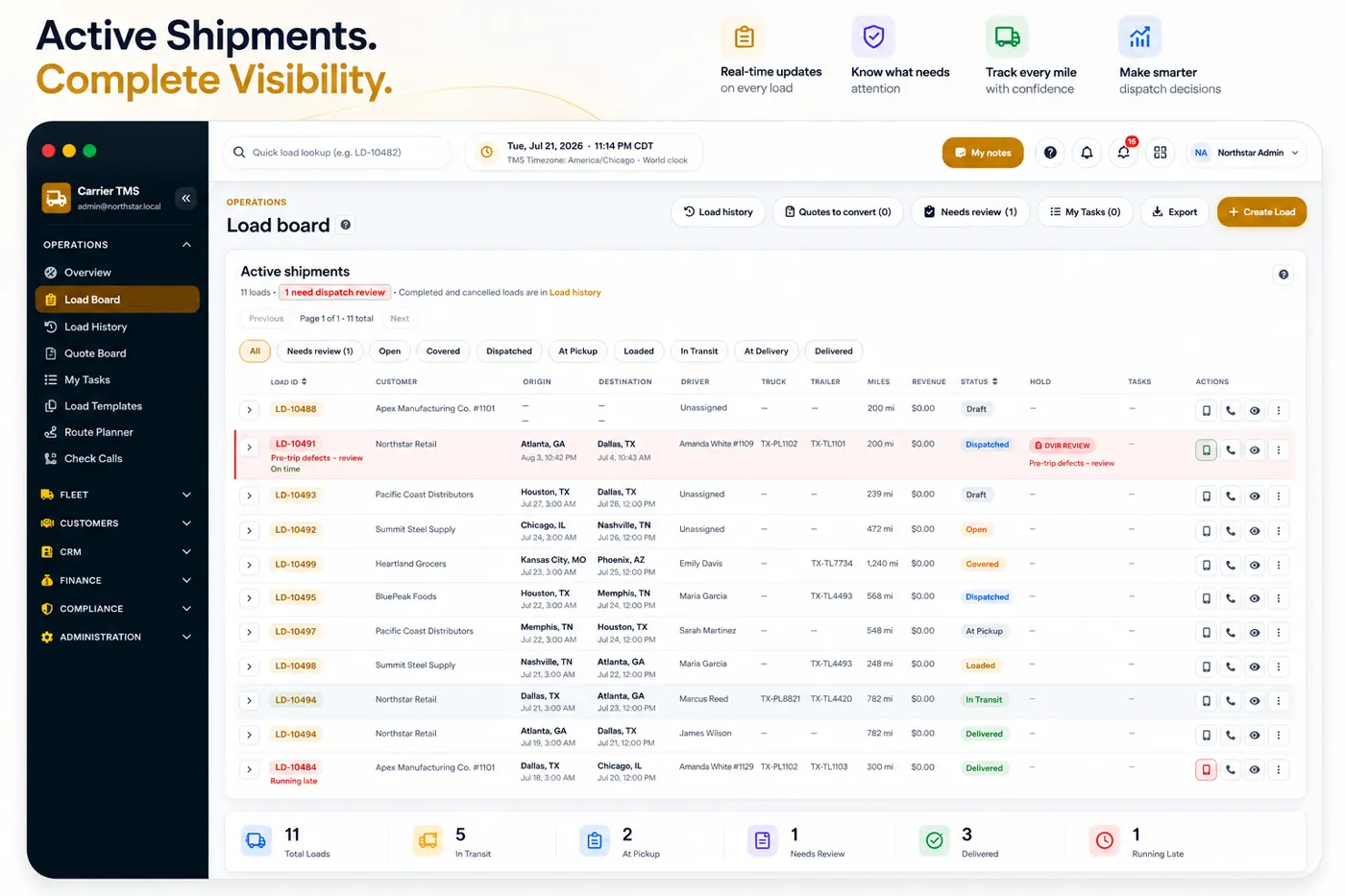
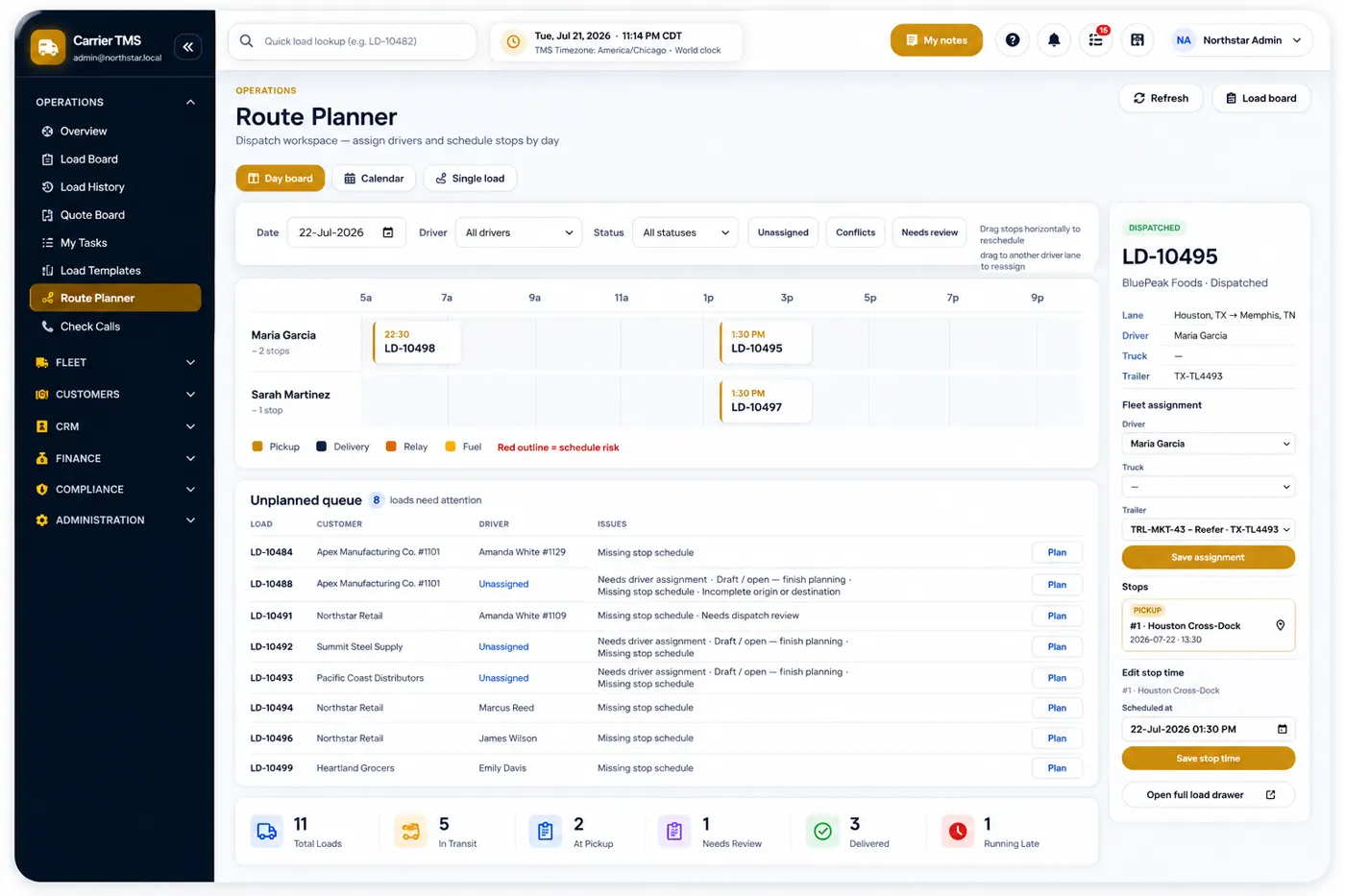
Dispatch board and live load status
Rate cons, BOLs, and PODs on every load
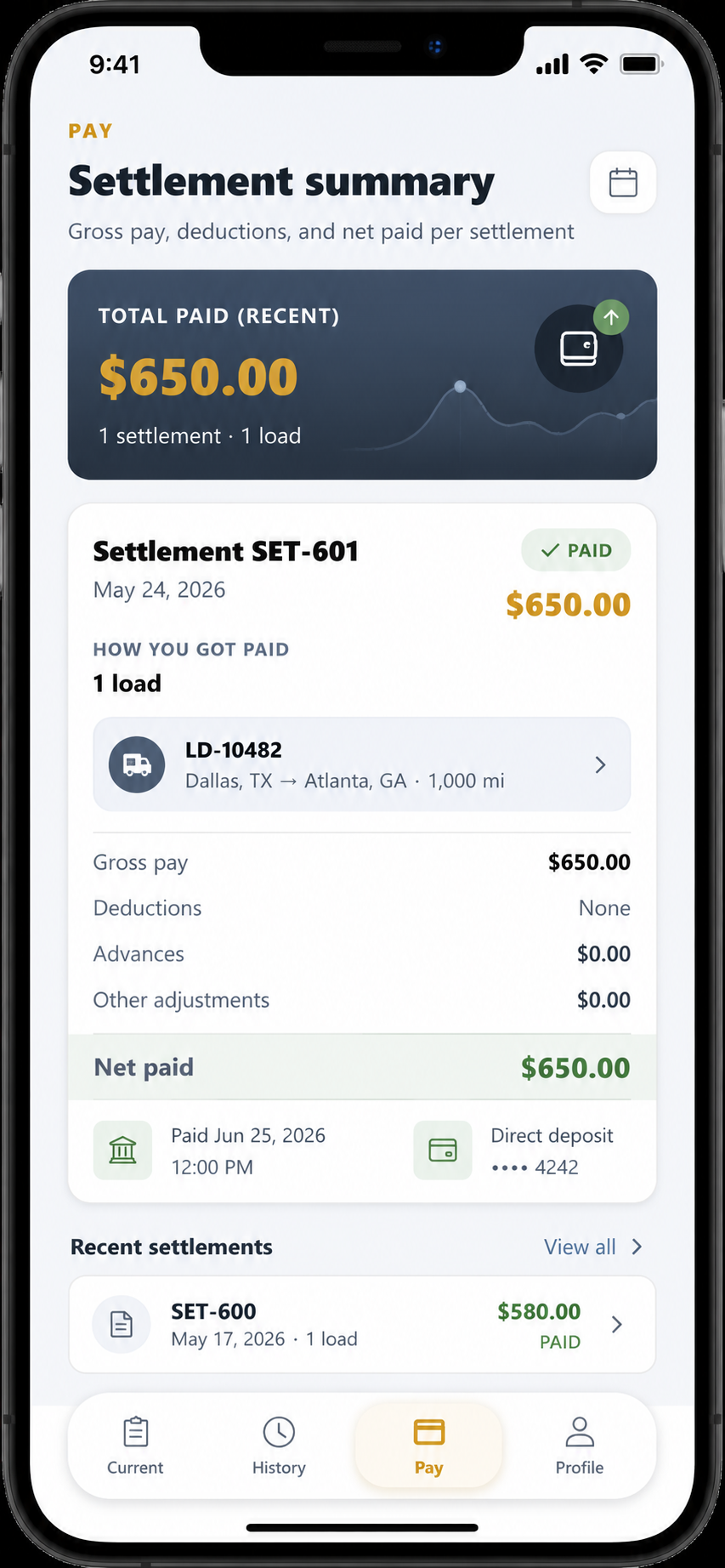
Invoicing and driver settlements
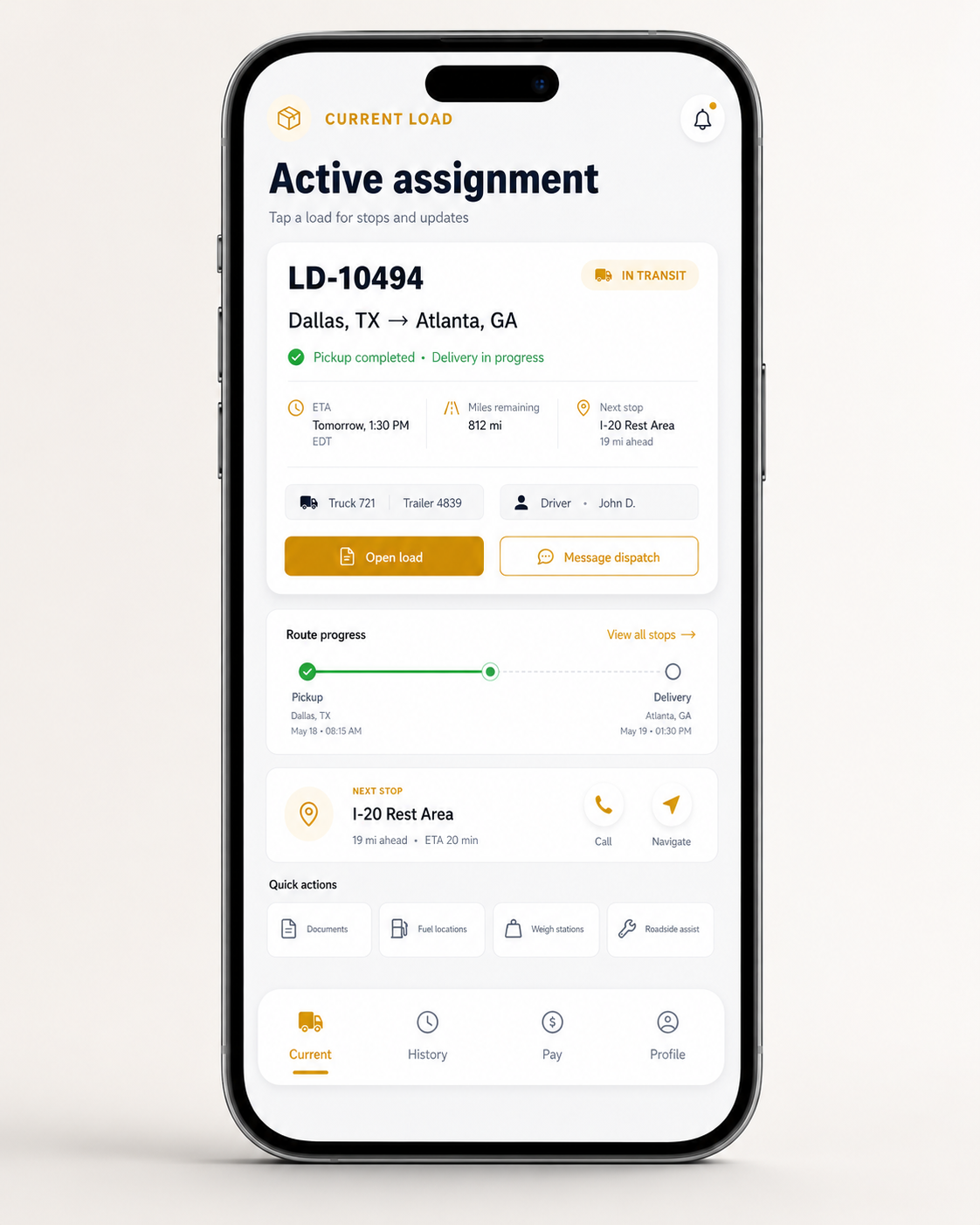
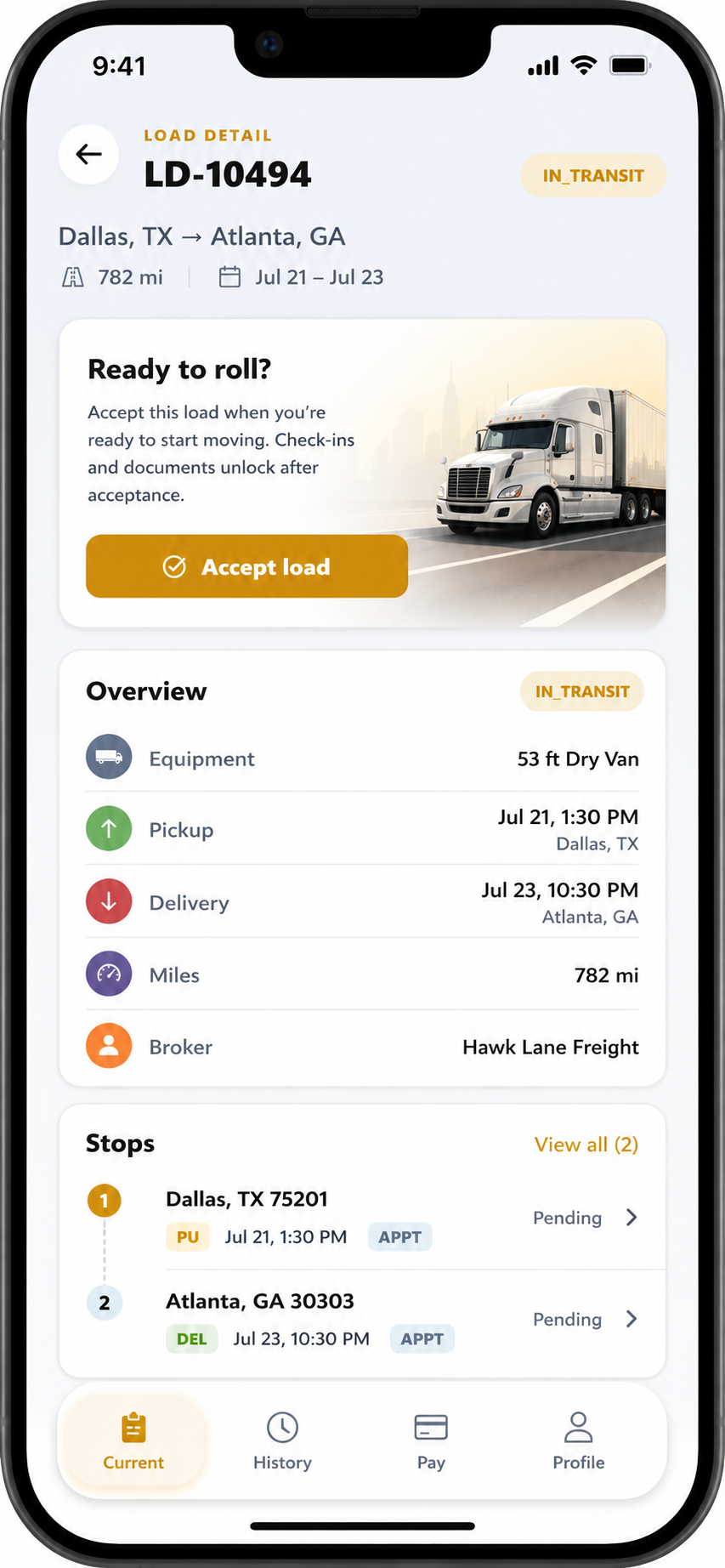
Driver app and customer tracking portal
AI Dispatcher is available. You don't have to type every load. See how it prepares a draft — talk to support to enable it.
If you are an owner-operator or run fewer than 3 trucks and mainly need a mobile app for loads, documents and expenses, you can use the TMS App. Stay on this page when you need a browser Carrier TMS with a dispatch board, invoicing and settlements.
How a Load Moves Through Carrier TMS
This is the daily path in Hawk Lane: book the shipment, keep paperwork on it, then invoice and settle. Optional AI Dispatcher drafts sit on top of that path — they do not replace dispatcher review.
Book and dispatch the shipment
The dispatch board is the working list: customer, pickup, delivery, driver, and status on one load.
Included in Carrier TMS
Book the shipment
Create the load with customer, lane, equipment, and rate.
Assign driver and truck
The office and the driver share the same assignment.
Update status on the board
Booked, in transit, and delivered stay on that load.
Share status when you need to
The customer portal is available on Growth and above.
Same load record
BoardAssignmentStatus
Keep paperwork on the same load
Rate cons, BOLs, and PODs attach to the shipment instead of a shared inbox or a paper folder.
Included in Carrier TMS
Rate confirmation on the load
The agreed rate sits with the shipment you are hauling.
BOL filed with the load
Pickup paperwork is stored on the same record.
POD from the driver
Delivery proof lands on the load, ready for billing.
Files ready to invoice
Staff do not hunt a mailbox to close the load.
Documents on the load
Rate conBOLPOD
Invoice, pay drivers, and close the load
Customer invoicing and driver settlements use the completed load — not a second spreadsheet.
Included in Carrier TMS
Delivery complete
Status and proof of delivery sit on the closed shipment.
Customer invoice
Bill from organized load information and documents.
Driver settlement
Pay is tied to the same load the driver hauled.
Load closed on the board
The office can see what is billed and what is still open.
One close-out
InvoiceSettlementClose-out
Optional: start from a draft instead of a blank load
When enabled, a supported tender, roster, email, or authorized voice input can prepare a draft. Someone still reviews it before the load is live.
Talk to support to enable
Supported input arrives
A rate confirmation, CSV roster, dispatch email, or authorized voice details reach Hawk Lane.
Fields are mapped
Configured pickup, delivery, customer, and rate values populate a draft.
Dispatcher reviews
Nothing is live until a person accepts or corrects the details.
Human review
Load continues on the board
From here dispatch, documents, and settlements follow the usual path.
Optional add-on
This is AI Dispatcher for load entry. It is not included with the Pro standard integration (QuickBooks Online, Motive or Samsara). See TMS workflow automation for PDF, CSV, email, voice, Microsoft Teams and WhatsApp setup.
Carrier TMS keeps dispatch, documents, and settlements on one load. AI Dispatcher drafts are optional — talk to support to enable them.
AI Dispatcher available
You Don't Have to Type Every Shipment
AI Dispatcher is available for Carrier TMS. When a supported rate confirmation, CSV roster, dispatch email or authorized voice input arrives, it can prepare a draft load on the board instead of asking staff to rekey pickup, delivery, customer and rate fields. Check calls — including spoken check calls — and channel updates can follow the same load record. A dispatcher still reviews before anything is live. This is not included with the Pro standard integration (QuickBooks Online, Motive or Samsara). Talk to support to enable the path that matches how freight reaches your desk. See TMS workflow automation for the full voice, PDF, CSV, email, Microsoft Teams and WhatsApp path.
Freight document intake
Supported PDFs, agreed CSV mappings and authorized mailbox messages can populate a draft load for dispatcher review — not a live shipment until someone accepts the details.
Check-call logging
Supported CSV status rows or authorized WhatsApp updates can add a check call to the matched load, so location and milestone notes sit on the shipment instead of in a chat thread.
Dispatch channel updates
Configured assignment, pickup, delivery or status details can be sent to an approved Microsoft Teams channel or WhatsApp recipient while the TMS remains the load record.
Paperwork on the matched load
A supported WhatsApp attachment can be stored on the load it matches — useful for PODs and photos that otherwise stay in a driver’s camera roll.
Inbound tender
A supported PDF, spreadsheet row, mailbox message or authorized voice input is the starting point — the same freight dispatch already receives.
Mapped draft load
Configured fields such as shipper, stops, equipment and rate land on a draft load. Missing or conflicting values are flagged.
Dispatcher review
Unmatched, duplicate or incomplete items wait for a person. Nothing is treated as a live load until dispatch accepts it.
Board and channels
Accepted loads stay on the dispatch board. Configured Teams or WhatsApp updates and later check calls attach to that same shipment.
Draft ready for review
Most fleets enable one inbound source first — for example broker PDFs or a check-call CSV — then add Microsoft Teams or WhatsApp after that path is reliable. Support confirms document formats, mailbox or channel permissions, volume and third-party compatibility before anything is turned on.
Create a reviewable draft load from a supported PDF.
Create multiple draft loads from an agreed CSV mapping.
Import supported check-call records from CSV.
Process supported messages from an authorized email inbox into a draft load.
Create a reviewable draft load from authorized voice input.
Log a check call from authorized voice input.
Share configured assignments or status updates through Microsoft Teams or WhatsApp.
Use authorized WhatsApp messages to update a matched load or check-call record.
Add a supported WhatsApp attachment to the matched load.
These automatic workflows are optional paid add-ons. They are separately quoted from monthly Carrier TMS plans. Third-party platform charges may apply.
Tell us a few details. No credit card required. Access Hawk Lane through your web browser; no desktop software to install. Support is available in English, Hindi and Punjabi.
Free plan for up to 3 active trucks
No credit card during the pilot
See Your Operation More Clearly
Real screens from Hawk Lane Carrier TMS and the driver mobile experience — dispatch, check calls, settlements, routing, and what drivers see on the road.
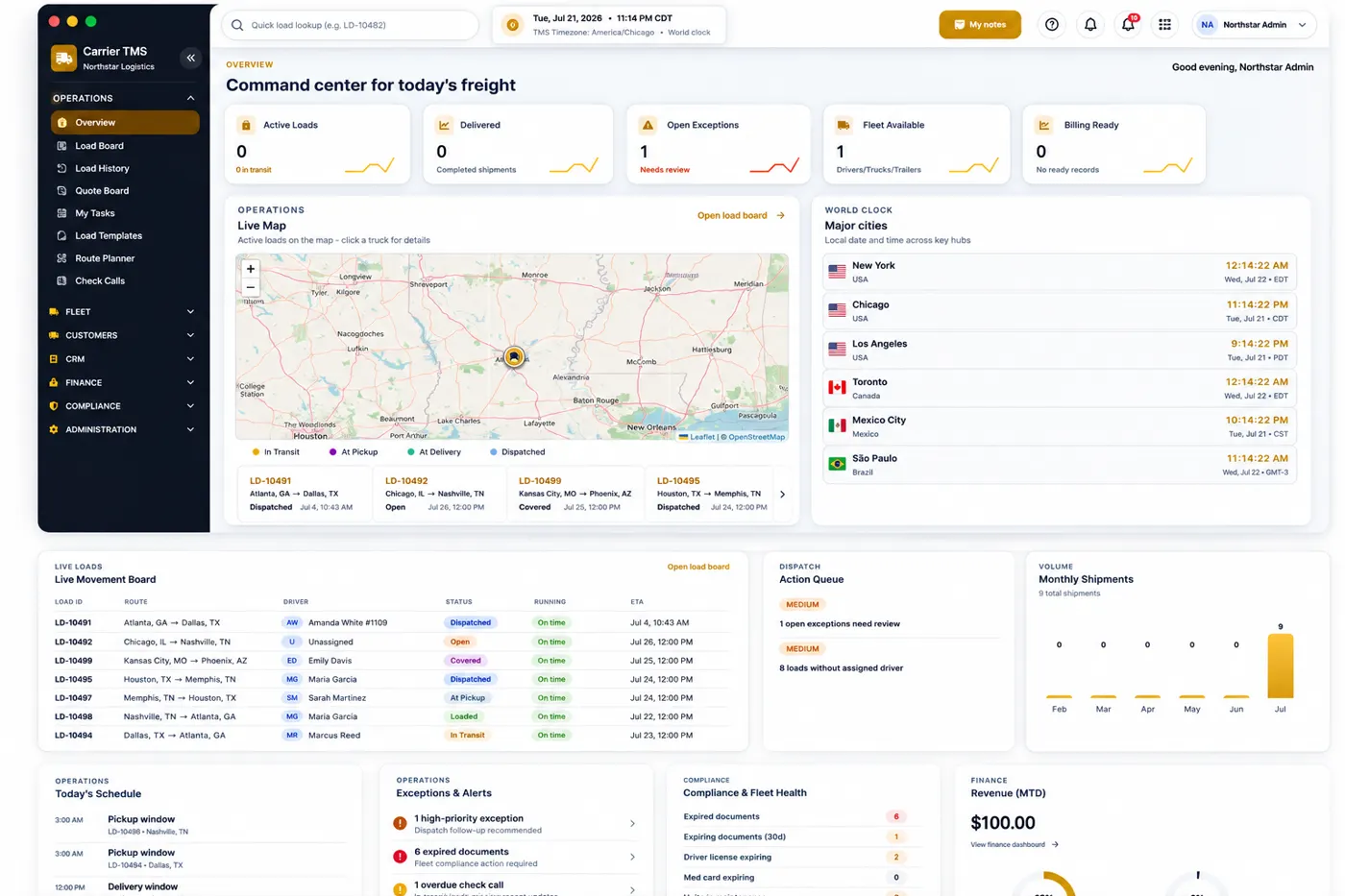
Dashboard
Operations dashboard for fleet status at a glance
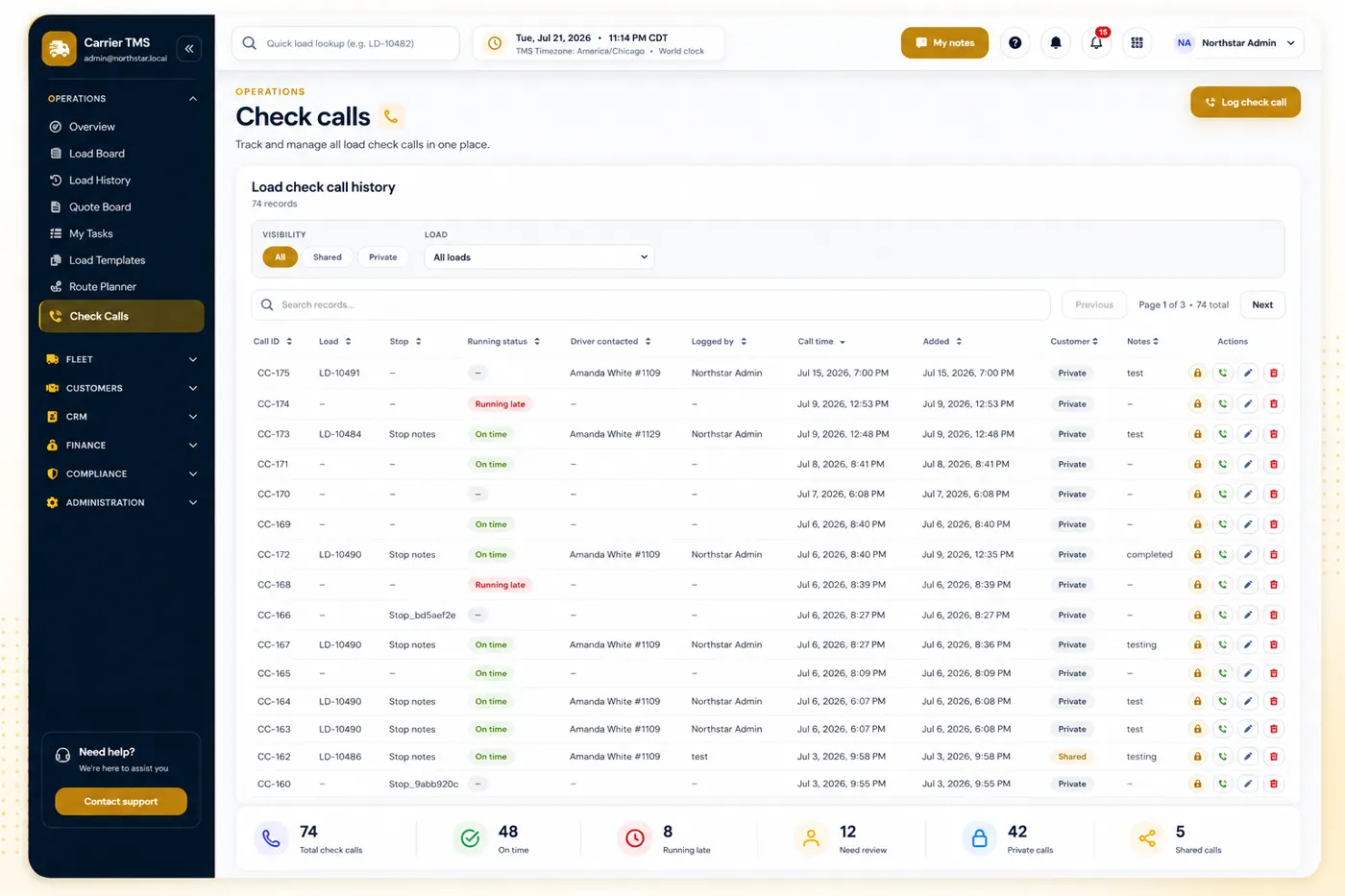
Check calls
Check-call history so dispatch stays aligned with drivers
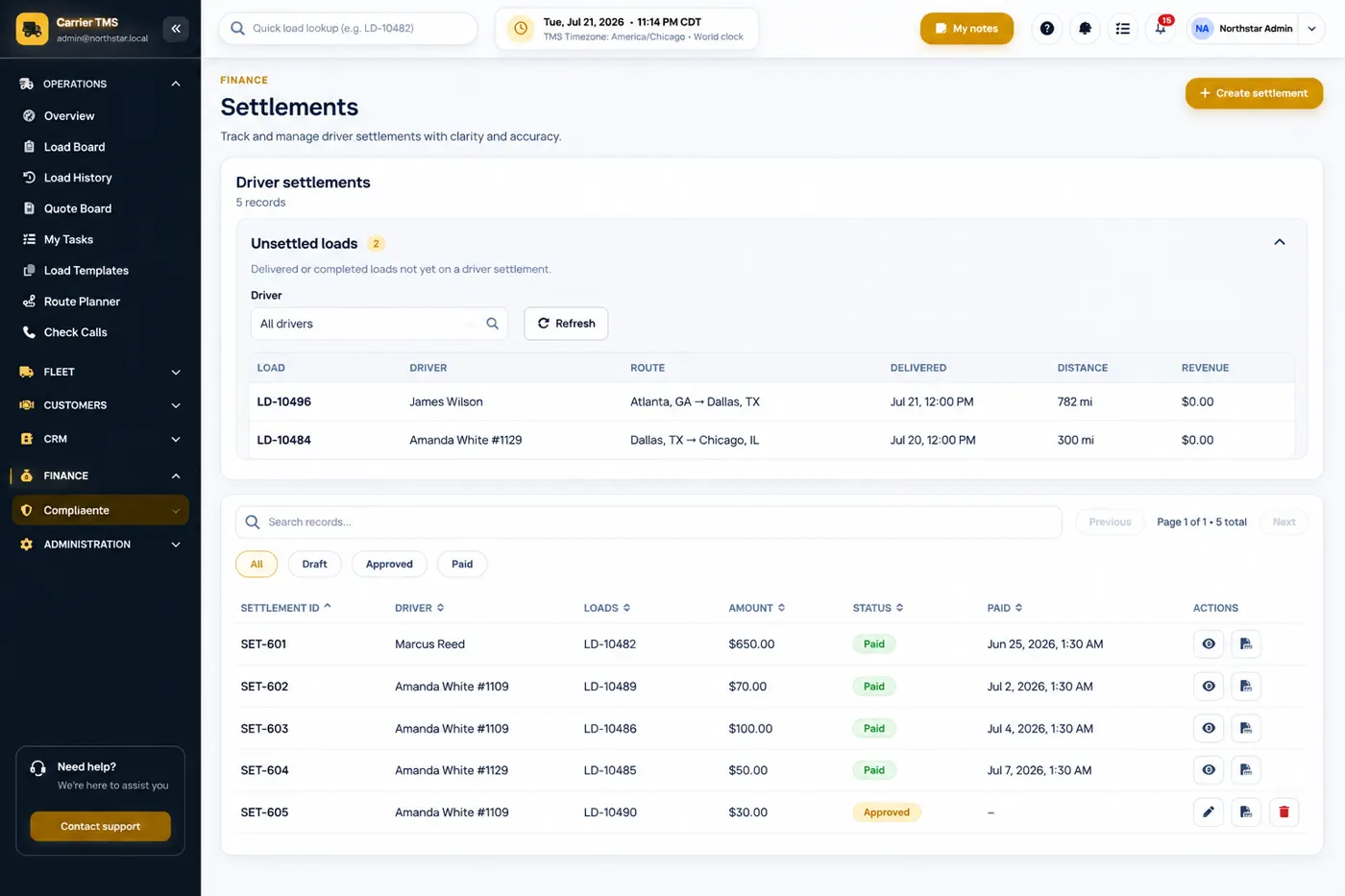
Driver settlements
Driver settlement management for pay, advances, and deductions
Built for Asset-Based Carriers, Not Freight Brokerages
This trucking software for carriers is focused on companies that operate their own trucks, drivers and trailers. It is designed for dispatching loads, managing driver updates, collecting documents, preparing invoices and reviewing load profitability.
Carriers of every size often manage dispatch, load documents, driver updates, settlements, and invoices across spreadsheets, text messages, email threads, and paper files. Hawk Lane brings those daily tasks into one workspace.
Loads Scattered Everywhere
Dispatch details live in spreadsheets, texts, emails, and notebooks, making it difficult to see what is happening.
Missing Documents
Rate confirmations, BOLs, PODs, receipts, and invoices are difficult to find when they are spread across phones and inboxes.
Manual Driver Settlements
Driver pay, advances, deductions, and settlement history become slow and error-prone when handled manually.
Delayed Invoicing
When PODs and supporting documents arrive late, invoices are delayed and cash flow suffers.
Constant Status Calls
Dispatchers and customers repeatedly ask where a truck is because load status is not centralized.
Complex TMS Products
Many systems assume enterprise IT teams and long implementations — more complexity than many carriers need to get started.
Start Free — Upgrade Only When You Need More
Company pricing based on active truck count — no per-driver or per-load billing during the pilot. Start on Free for up to 3 trucks with no credit card, and move up only when you need the driver app, customer portal, or guided setup. See TMS software pricing for a dedicated plan comparison.
Start Here
Free
$0/company/month
Up to 3 active trucks · 2 staff users
Run real loads in Hawk Lane with core dispatch, documents, PODs, and basic invoicing — self-guided setup, no credit card.
Includes:
Company dashboard, loads, and dispatch board
Freight documents, BOL, rate con, and POD handling
Basic invoicing and load summary reporting
CSV export of your operational data
Email support
Not included: driver app, customer portal, settlements, integrations, or guided onboarding.
Most Popular
Growth
$99/company/month
Up to 10 active trucks · 5 staff users
Bring drivers, dispatch, and customers into the same workflow with guided initial setup.
Everything in Free, plus:
Driver app and customer tracking portal
Driver settlements, advances, and history
Standard load P&L and operational reports
One 60-minute guided setup session
Priority email support
Standard integrations are not included. Customization is available at extra cost.
Pro
$199/company/month
Up to 20 active trucks · 10 staff users
Advanced reporting, standard master-data migration, and one supported integration.
Everything in Growth, plus:
Advanced reporting and profitability views
One standard CSV master-data migration
One supported standard integration — your pick of QuickBooks Online, Motive, or Samsara
Priority onboarding and priority support queue
Additional customization is available at extra cost. The one supported standard integration does not include PDF, CSV, email, Microsoft Teams or WhatsApp workflow automation.
Custom
Quoted based on scope
Customization for small fleets (e.g. 3 trucks) through fast-growing companies
Quoted when you need tailored limits, multiple integrations, EDI, historical load migration, or custom workflows that exceed Pro.
Typically includes:
Everything in Pro, where applicable
Negotiated truck and staff limits
Multiple integration providers or EDI
QuickBooks Online, Motive, Samsara, or custom API
Historical migration and custom reports
Workflow customization for your dispatch process
Dedicated implementation and contracted support
Custom pricing reflects implementation scope and ongoing support — not a hidden discount tier.
You will not receive an empty account and be left to configure everything alone. Our team can help set up your Hawk Lane company profile, trucks, trailers, drivers, customers, and initial workflow so you can start using Hawk Lane with less effort.
Guided account setup
Trucks and drivers added to your workspace
Customer profiles configured
Initial workflow assistance
Help entering your first loads
Personal onboarding support
Full data migration, third-party integrations, and custom development are subject to review — not included by default.
Switching from another TMS or spreadsheets? Hawk Lane can help you move your data. Share a sample export and we'll confirm what can be imported, the timeline and any setup cost before you switch. Pro includes one standard CSV master-data migration. Historical loads, and anything beyond that clean import, are quoted. Not every record, attachment or workflow transfers automatically. Ask about data migration.
TMS Software for Carriers Running Their Own Trucks
TMS software for carriers should cover the whole day, not one slice of it — dispatch, documents, driver settlements, billing, and load visibility, without enterprise clutter.
Dispatch Board
See active, upcoming, delivered, and completed loads from one clear dispatch view. Daily assignment and check calls are covered on trucking dispatch software.
Load Management
Store pickup, delivery, customer, broker, rate, equipment, and route details for every load.
Driver Management
Assign drivers, track load responsibility, and keep driver details organized.
Document Management
Keep rate confirmations, BOLs, PODs, receipts, and supporting documents attached to the correct load.
Driver Settlements
Calculate driver pay, deductions, advances, and settlement history with fewer manual steps. See driver settlement software.
Billing and Invoicing
Prepare invoices faster using organized load information and delivery documents.
Load Tracking
Monitor load progress and reduce repeated status calls with clearer visibility.
Customer Access
Give customers a cleaner way to check load status without calling dispatch every time.
Hawk Lane gives owners and dispatchers professional tools without enterprise-level complexity — practical setup, direct support, and room to grow as your fleet does.
Carrier need
Hawk Lane approach
Fast setup
Guided onboarding
Easy dispatching
Simple visual dispatch board
Organized paperwork
Load-level document storage
Driver pay
Settlement and deduction tracking
Faster invoicing
Documents and billing in one workflow
Direct support
Access to the product team
Low complexity
Features focused on real dispatch and back-office workflows
What Is a Carrier Management System?
A carrier management system is the software an asset-based trucking company uses to run its own freight: loads, dispatch, drivers, trucks, trailers, documents, PODs, invoicing and settlements in one record instead of five disconnected tools. It is also called a carrier TMS, and the two terms describe the same product.
A carrier TMS application for asset-based trucking
Hawk Lane is browser-based carrier TMS software built around the way a carrier actually works — you own the trucks, you assign the drivers, and you bill the customer. Every load record carries the assignment, the documents, the invoice, and the driver pay together.
Carrier management system vs shipper TMS
A shipper TMS is built for companies that buy transportation: comparing rates, tendering freight to carriers, and tracking inbound and outbound orders. A carrier management system is built for the company that moves the freight. If you dispatch your own equipment, you want the second one.
A TMS platform sized for 2–20 trucks
Hawk Lane's standard plans cover fleets from a single truck through roughly 20 active trucks. That is deliberate: enterprise TMS platforms assume implementation teams and dedicated admins that a small carrier does not have. Larger or more complex operations are quoted as Custom.
People searching for TMS software or a TMS platform are usually looking for one shared system for booked loads — not a desktop install and not a GPS-only tracker. Hawk Lane is a browser-based TMS platform for small carriers: dispatch, documents, invoicing and settlements sit on the same load record.
One platform, not five tools
TMS software for a 2–20 truck fleet should cover the dispatcher’s board, the paperwork, and the back office. Hawk Lane is that TMS platform: you sign in from a supported web browser, with no office-only server.
Sized for small carriers
Standard plans start at Free for 3 active trucks and run through Pro at 20. Enterprise TMS platforms assume implementation teams most small carriers do not have. Larger or unusual workflows are quoted as Custom.
Cloud TMS, optional integrations
The platform is cloud TMS. Pro includes one supported standard integration of your choice — QuickBooks Online, Motive or Samsara. Extra customization is paid. Optional document, email and messaging workflows are separately quoted.
TMS Systems for Trucking Companies
Different TMS systems exist because shippers, brokers and carriers run different jobs. “TMS software” is the category; the system you need depends on who owns the trucks and who books the freight.
TMS system
Who it is for
Hawk Lane
Carrier TMS
Asset-based trucking companies that dispatch their own drivers and equipment
This page — Simple Carrier TMS
Broker TMS
Freight brokerages that tender loads to other carriers
Companies that buy transportation and tender freight out
Not Hawk Lane’s product
If you operate trucks, you want a carrier TMS system, not a shipper or brokerage platform with “dispatch” bolted on. For the broader trucking-TMS explanation, see trucking TMS software.
How Carrier TMS Relates to Fleet TMS
Hawk Lane Carrier TMS is the main product for asset-based trucking companies: dispatch, documents, settlements, invoicing, and the plans you start on. It is carrier TMS software — TMS software for carriers that run their own trucks — not a separate fleet-tracking product.
Fleet TMS focuses specifically on fleet-wide equipment and driver operations: trucks, trailers, assignments, and the operating record across the whole fleet. Explore fleet TMS software.
Use this Carrier TMS page to request access and compare plans. Use the fleet page when you want the equipment-and-driver operations explanation in more depth.
When Standard Plans Are Not Enough
Free, Growth, Pro and Custom are cloud TMS plans. If the workflow, integrations or portals go beyond ordinary configuration, custom transportation management system development as a separately quoted engineering engagement.
Compare Plan Features
Every capability side by side. Scroll horizontally on smaller screens to see all four plans.
Capability
Free
Growth
Pro
Custom
Active trucks
3
10
20
Negotiated
Active staff users
2
5
10
Negotiated
Core web TMS
Yes
Yes
Yes
Yes
Driver app
No
Yes
Yes
Yes
Customer portal
No
Yes
Yes
Yes
Driver settlements
No
Yes
Yes
Yes
Standard load P&L
No
Yes
Yes
Yes
Advanced reporting
No
No
Yes
Yes
Guided setup
No
One 60-minute session
Priority setup
Scoped
Standard migration
No
No
One clean import
Scoped
Standard integrations
None
None
One — your pick of QuickBooks Online, Motive or Samsara
Free carriers use self-guided setup. Growth and Pro include one 60-minute guided setup session from the Hawk Lane team.
1. Tell Us About Your Operation
Share your fleet size, equipment, common lanes, and how you manage loads today.
2. Get Access or Onboarding
Free accounts receive login instructions and self-guided setup. Growth and Pro include one 60-minute guided setup session for trucks, drivers, and customers.
3. Review Your Workflow
We walk you through dispatch, documents, settlements, invoicing, and load tracking.
4. Start Managing Real Loads
Begin using Hawk Lane with guided support instead of starting from an empty account.
Frequently Asked Questions
Yes — they describe the same product. A carrier management system, a carrier TMS, and a TMS application for asset-based trucking all refer to the software a carrier uses to run its own loads, drivers, equipment, documents, invoicing, and settlements. A shipper TMS is a different category, built for companies buying transportation rather than moving it.
It is designed for asset-based trucking carriers — from owner-operators adding their first drivers to established fleets — that want to replace spreadsheets, email threads, text messages, and disconnected tools with one workspace.
If you mainly need a mobile app for loads, PODs, BOLs, receipts and expenses, you can use the TMS App. Carrier TMS is the browser TMS when you need a dispatch board, invoicing and settlements for a small fleet — including a Free plan for up to 3 trucks.
This landing page and product setup are focused on asset-based carriers. Hawk Lane also offers separate solutions for freight brokers, but the Simple Carrier TMS is built around fleet and driver operations.
Yes. We recommend beginning with a controlled number of real loads so your team can learn the workflow before moving more of the operation into the system.
Free accounts use self-guided setup with help content. Growth and Pro include one 60-minute guided setup session — company profile, initial trucks/drivers/customers, and workflow review. Full migration and integrations are not included on Free or Growth.
Switching from another TMS or spreadsheets, Hawk Lane can help you move your data after reviewing a sample export. We confirm what can be imported, the timeline and any setup cost before you switch. Pro includes one standard CSV master-data migration. Historical loads and work beyond that clean import are quoted. Full migration is not included on Free or Growth, and not every record transfers automatically.
Yes. Load-related documents can be kept with the correct load so dispatch, billing, and settlement information is easier to find.
Driver settlements are included on Growth, Pro, and Custom plans. The Free plan includes core dispatch, documents, and invoicing but not driver settlements.
The customer tracking portal is included on Growth, Pro, and Custom plans. Free accounts can manage loads internally without customer portal access.
Free is $0/month for up to 3 active trucks and 2 staff users. Growth is $99/month for up to 10 trucks. Pro is $199/month for up to 20 trucks and includes one supported standard integration of your choice: QuickBooks Online, Motive, or Samsara. Custom is quoted for larger fleets or complex requirements. No credit card is required to request Free access.
Submit the short form with your name, number of trucks, business email and phone. Paid plans are activated after invoice and setup scheduling.
This Carrier TMS page is focused on asset-based carriers that operate trucks, drivers and trailers. Broker workflows are handled on our Broker TMS page.
Yes. Hawk Lane is designed for small and growing fleets that want to move beyond spreadsheets, calls and scattered documents.
The Driver App is included in Growth, Pro and eligible Custom plans.
Yes. Hawk Lane is a cloud TMS platform accessed from a supported web browser. There is no desktop download. A TMS cloud setup means dispatchers and owners can sign in from the office, home, or the road within plan user limits.
Pro includes one supported standard integration of your choice: QuickBooks Online, Motive, or Samsara, subject to compatibility and setup. Free and Growth do not include a standard integration. Additional customization, including extra integration work, is available as paid support on Growth, Pro, and Custom. PDF, CSV, email, Microsoft Teams and WhatsApp workflow automation is not included with that standard integration — talk to support to enable it.
Yes. AI Dispatcher is available as an optional add-on. You do not have to type every shipment. It can create reviewable draft loads from voice, supported PDFs, CSVs or emails, log check calls from voice, and share dispatch updates through Microsoft Teams or WhatsApp. These workflows are separately quoted and are not included with the Pro standard integration. Talk to support to review your documents, channels and volume and enable them.
When the PDF layout is supported and the workflow is configured, Hawk Lane can prepare a reviewable draft load from that document. Dispatch still checks extracted fields before the load is used live. Talk to support to confirm your document types.
AI Dispatcher is the product name for this capability. Optional workflows that prepare reviewable draft loads from voice, PDFs, CSVs or email are part of AI Dispatcher, so you do not retype every shipment. Load–truck matching suggestions are also part of AI Dispatcher. In both cases a person reviews before anything goes live.
No. Configured workflows create draft loads or matched updates. Incomplete, duplicate or unmatched items go to review. A dispatcher decides when a draft becomes a live load.
In practice, yes for a small carrier. TMS software, a TMS platform and a carrier TMS all describe the system that holds booked loads, dispatch, documents, invoicing and settlements. Hawk Lane is a cloud TMS platform accessed from a web browser. It is not a desktop install, a load board or a GPS-only tracker.
The main difference is who the software is built for. Carrier TMS systems run an asset-based fleet’s own trucks and drivers. Broker TMS systems manage freight tendered to other carriers. Shipper TMS systems help companies buy transportation. Hawk Lane Simple Carrier TMS is a carrier TMS. Broker workflows are on the Broker TMS page. We do not sell a shipper TMS.
Yes. Carrier TMS is a fleet TMS for small trucking companies — a TMS fleet management system for booked loads, trucks, trailers, drivers, documents, invoicing, and settlements. It is not a GPS-only tracker or a load board.
Yes. Support is available in English, Hindi and Punjabi by phone and email.
Cloud TMS Platform vs Spreadsheets
Hawk Lane is a cloud TMS platform: you sign in from a supported web browser, with no desktop install and no office-only server. A TMS cloud setup like this is what lets a second dispatcher or the owner check loads from home. TMS integration is optional — Pro includes one supported standard integration of your choice (QuickBooks Online, Motive, or Samsara); extra customization is paid on Growth, Pro, and Custom.
Before Hawk Lane
Excel sheets for every load
Texts and emails for driver updates
PODs lost in camera rolls
Manual driver settlements
Delayed invoicing
Constant where-is-my-truck calls
With Hawk Lane
One dispatch board for active loads
Driver app for documents and updates
Digital documents on each load
Organized driver settlements
Faster billing workflow
Clearer load visibility
Ready to Run Your Fleet in Hawk Lane?
Start with Free for up to 3 trucks, or book a walkthrough for Growth and Pro when you need driver app, customer portal, and guided setup.