Freight broker software in your browser

Freight Broker TMS for Small Brokerages

Cloud-based freight broker TMS. Quote, cover, bill and track margins in one browser. Free for 1 user and up to 10 loads a week.

Hawk Lane is freight broker software for small brokerages: a cloud-based TMS for freight brokers and 3PLs to quote, cover, track documents, bill customers and see load margin without enterprise software.

Free Broker TMS covers 1 user and up to 10 loads a week. Broker TMS Pro is $30 per user per month with unlimited loads. See broker pricing. We help configure your account, users, and carrier profiles.

  • Keep every load, RateCon, and carrier record organized
  • Carrier onboarding records — documents, history and rates on each carrier profile
  • See margin more clearly as you quote and cover
  • Start free, then $30 per user per month for unlimited loads

Access Hawk Lane through your web browser. No desktop software download required.

New here? See how Broker TMS works from quote to invoice.

Need one workflow? Explore standalone broker modules.
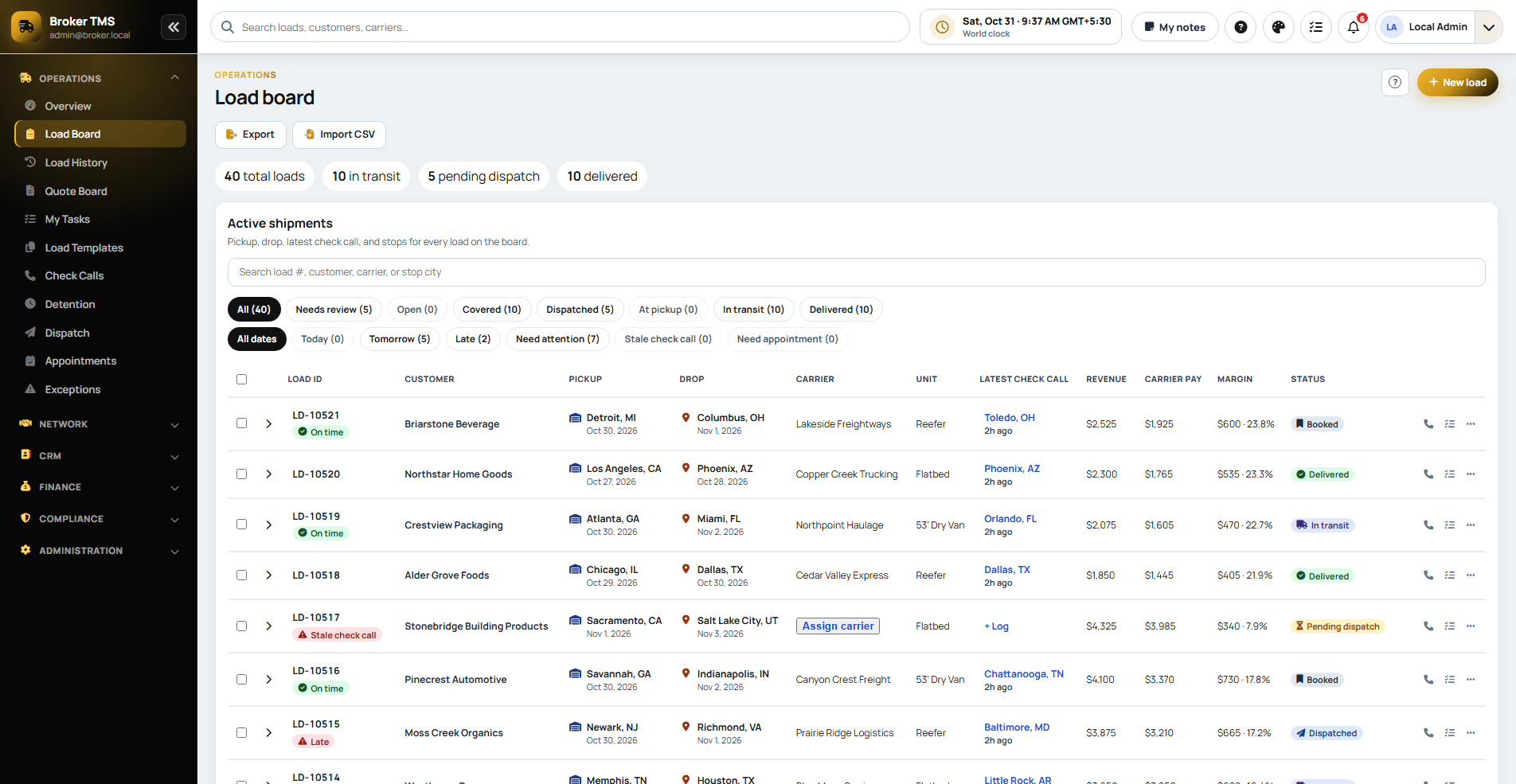
Broker load board
Broker load board showing revenue, carrier pay, margin and shipment status

Get Free Access

Tell us a few details. No credit card required. Access Hawk Lane through your web browser; no desktop software to install.

  • Free Broker TMS: 1 user, up to 10 loads a week
  • Access through your web browser — no installer

By submitting this form, you agree that Hawk Lane Tech may contact you about your Free Broker TMS request. We use your information to respond to your request. We regularly receive spam requests, so we verify some details only to confirm the request is genuine. See our Privacy Policy and Terms.

From Quote to Invoice in One Simple Workflow

A practical path from quoting and covering through documents, billing, and margin tracking. Tap a step to see how that part of the load record works.

Enter the Load

Capture customer, lane, equipment, rate, and load details in one place.

Carrier profiles included; load-board posting reviewed separately

Customer and lane

Who the freight is for and where it needs to move.

Equipment and timing

What you are quoting and when it has to pick up.

Rate on the load

The quoted price lives on the same record you will cover and bill.

One brokerage load
Quote detailsOne record

Cover With a Carrier

Select a preferred carrier from your profiles and assign the load, then keep cover details with the load.

Included in Broker TMS

Preferred-carrier profiles

Carrier records keep contacts, saved lanes, history, packets, insurance documents and your team's ratings together.

Assign the cover

The chosen carrier is stored on the brokerage load.

Post when you need capacity

Load-board posting is reviewed during setup when you still need a truck. It is not assumed on every plan.

Cover on the load
ProfilesCoverPosting

Track Progress

Update status from booked through pickup and delivery.

Included in Broker TMS

Booked

The covered load is the working record.

Pickup to delivery

Status updates stay on that load instead of a side chat.

Delivered

The office can see what still needs paperwork or billing.

Status on the load
BookedIn transitDelivered

Collect Documents

Store RateCons, BOLs, PODs, and supporting paperwork with the load.

Included in Broker TMS

Rate confirmation

Customer and carrier paperwork attach to the shipment.

BOL on the load

Pickup documents are not left in an inbox.

POD ready to bill

Delivery proof sits with the load you will invoice.

Paperwork on the load
RateConBOLPOD

Invoice & Review Margin

Bill with complete records and review margin on the closed load.

Included in Broker TMS

Documents complete

Billing starts from organized load files, not a scavenger hunt.

Invoice the customer

Prepare invoices from the same load you quoted and covered.

Review margin

Rate and carrier cost sit together so margin is visible on the closed load.

Quote to invoice
InvoiceMargin

Get Free Access — Free Broker TMS covers 1 user and up to 10 loads a week.

Broker TMS is the quote-to-invoice workspace: cover, documents, billing, and margin on one load. It is not a claim that Hawk Lane books trucks or types tenders for you.

What Sits on One Broker Load

The broker record is the load itself: the quote, the covering carrier, the RateCon Broker TMS generates and emails, the POD you attach, the invoice and the margin.

A labelled example

A small brokerage quotes a Dallas–Atlanta dry van at $2,400 and covers it with a carrier at $1,900. The rate confirmation is generated from that load and emailed to the carrier, the POD is attached, the invoice is prepared from it, and the margin is the customer rate minus the carrier cost. This is an example record, not a Hawk Lane customer or a published rate.

Billing and QuickBooks Online

Broker TMS prepares the customer invoice from the load. That is an operations record, not a full accounting suite. Load-linked customer invoices go to QuickBooks Online as a $50 per month add-on on Broker TMS Pro. Settlement amounts are not synced, and customer and carrier details stay in Hawk Lane. Desktop is a Custom review.

Customer PDFs and emails

Standard Broker TMS starts with you quoting and covering the load. If a supported customer PDF or authorised email should prepare a reviewable draft first, that is a separately quoted add-on. A person checks the draft, and Hawk Lane does not choose the covering carrier. Once you cover the load, Broker TMS generates the rate confirmation and emails it to the carrier. See broker workflow automation.

Looking for software for an asset-based carrier fleet? View Carrier TMS.

Running a Small Brokerage Should Not Feel Chaotic

Small brokerages often manage quotes, covers, carrier checks, documents, and invoices across texts, emails, spreadsheets, and load boards. Hawk Lane brings those daily tasks into one simple workspace.

Loads Live in Too Many Places

Quotes, covers, and updates get scattered across texts, emails, notes, and load boards.

Missing RateCons and Docs

Rate confirmations, BOLs, PODs, and invoices are hard to find when they live in inboxes and phone galleries.

Disorganized Carrier Profiles

Preferred carriers, onboarding packets, documents and prior rates get messy as volume grows.

Unknown Margins

When rates and carrier costs are not tied to the same load record, true margin is hard to see.

Slow Invoicing

When paperwork arrives late or incomplete, billing stalls and cash flow suffers.

Enterprise TMS Overkill

Many brokerage systems are built for large teams and bring more setup and complexity than a small brokerage needs.

Freight Broker TMS Features for Daily Brokerage Work

Keep quotes, covering carriers, carrier onboarding records, documents, customer invoices and load-level margins in one browser workflow. Load-board posting, factoring and other connections are subject to review, not assumed in the Free plan.

Load Management

Keep pickup, delivery, customer, carrier, rate, and status details organized for every load.

Carrier Records & Repeat Booking

Find past carriers, review saved lanes and history, and keep your team's ratings, carrier packets and insurance documents together.

Document Management

Keep RateCons, BOLs, PODs, and supporting paperwork attached to the correct load.

Margin Visibility

See margin and rep performance more clearly as loads move from quote to invoice.

Load Board Posting

Load-board posting is reviewed during setup. It is not assumed to be included on every plan, and a board is not the system of record for the load.

Billing & Invoicing

Prepare invoices faster using organized load information and delivery documents.

Factoring & Pay

Factoring and carrier-pay connections are reviewed during setup. They are not described as included with Free Broker TMS.

Team-Ready Ops

Built to scale from a solo broker to a growing team without forcing an enterprise re-platform.

Use One Broker Workflow Without Replacing Your TMS

Hawk Lane Broker TMS modules can operate independently. Start with the problem your team needs to solve: carrier records, load-status records, document collection, customer invoicing or margin tracking.

Tell us what you use today and which workflow you need. We will confirm the module scope, setup, price and any connection to your current system before you start. Standalone access has separate terms from the Free Broker TMS offer.

Onboard Carriers. Keep Their History. Find Them Again.

Keep carrier onboarding details, packets, insurance documents, saved lanes, past work and your team's ratings in one carrier record. Find a carrier you have worked with before and review the information your brokerage saved when covering another load.

  • Carrier onboarding records — contacts, checklists and the information collected when the carrier first works with your brokerage
  • Packets and insurance documents — saved paperwork stays with the carrier record for your team to review
  • Saved lanes and history — review lanes, previous loads and recorded rates when considering the carrier again
  • Internal ratings — use ratings recorded by your brokerage's team, not an external safety score
  • Existing carrier lookup — find the previous carrier record instead of rebuilding the same file from email

Review carrier onboarding software for freight brokers for the dedicated record, expiry-date check and FMCSA lookup workflow.

Reuse the carrier record, then confirm current availability and review current documents, authority and insurance before the next booking. Saved records and your team's ratings are not external safety scores or live insurance verification. For a practical review process, use the carrier vetting checklist for freight brokers.

Join the Hawk Lane Founding Broker Program

We are onboarding a limited number of small brokerages that want a simpler way to manage their operation and are willing to share practical feedback as they use Hawk Lane on real loads.

  • Free assisted setup
  • Direct onboarding with the Hawk Lane team
  • Flexible early-access pricing for qualifying Founding Broker Program participants
  • Help importing basic company, user, and carrier information
  • Direct product feedback channel
  • Priority support during the pilot period

Hawk Lane is actively improving with feedback from real brokerage operations.

Join the Founding Broker Program →

Inside Broker TMS

See the Freight Brokerage Workspace

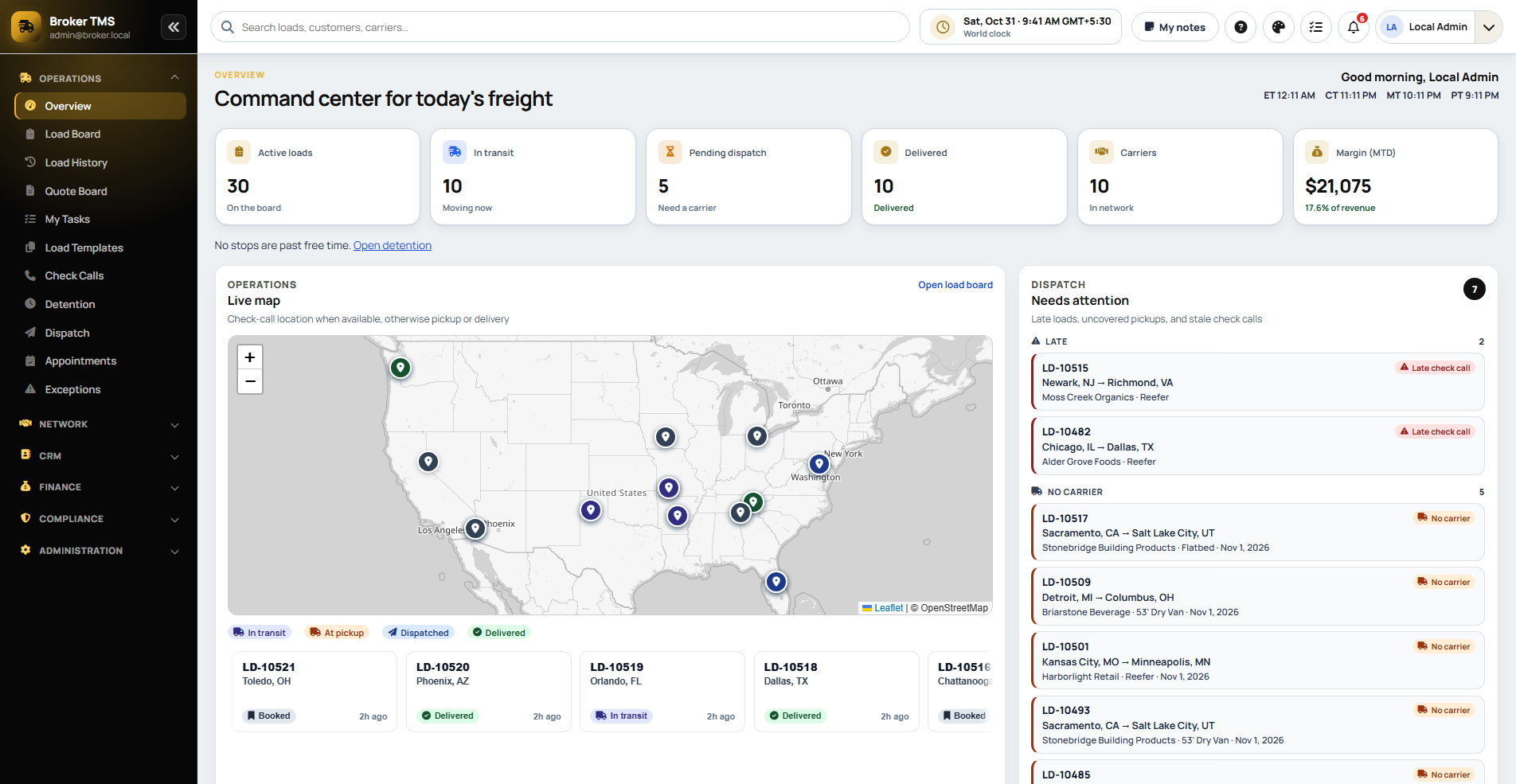
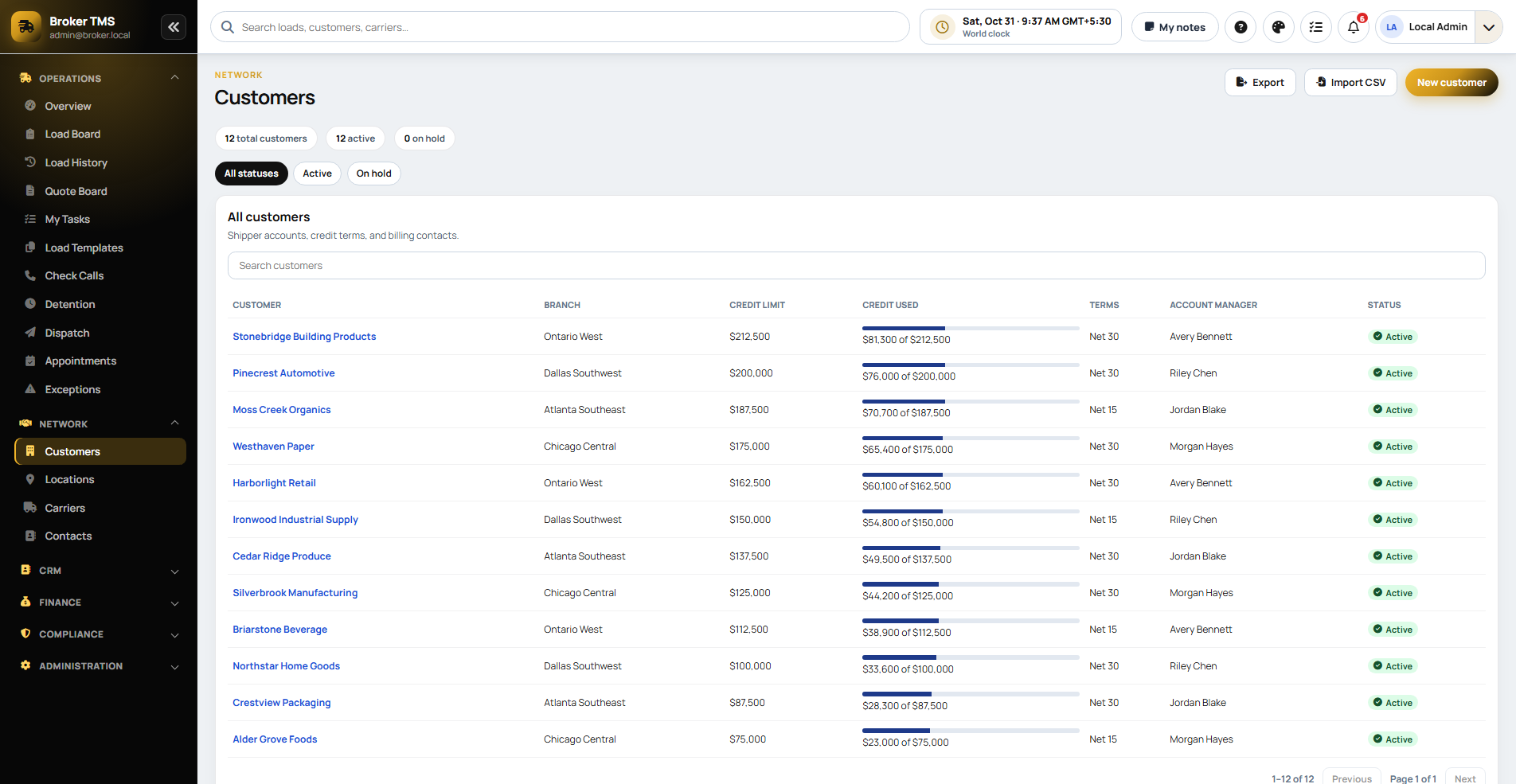
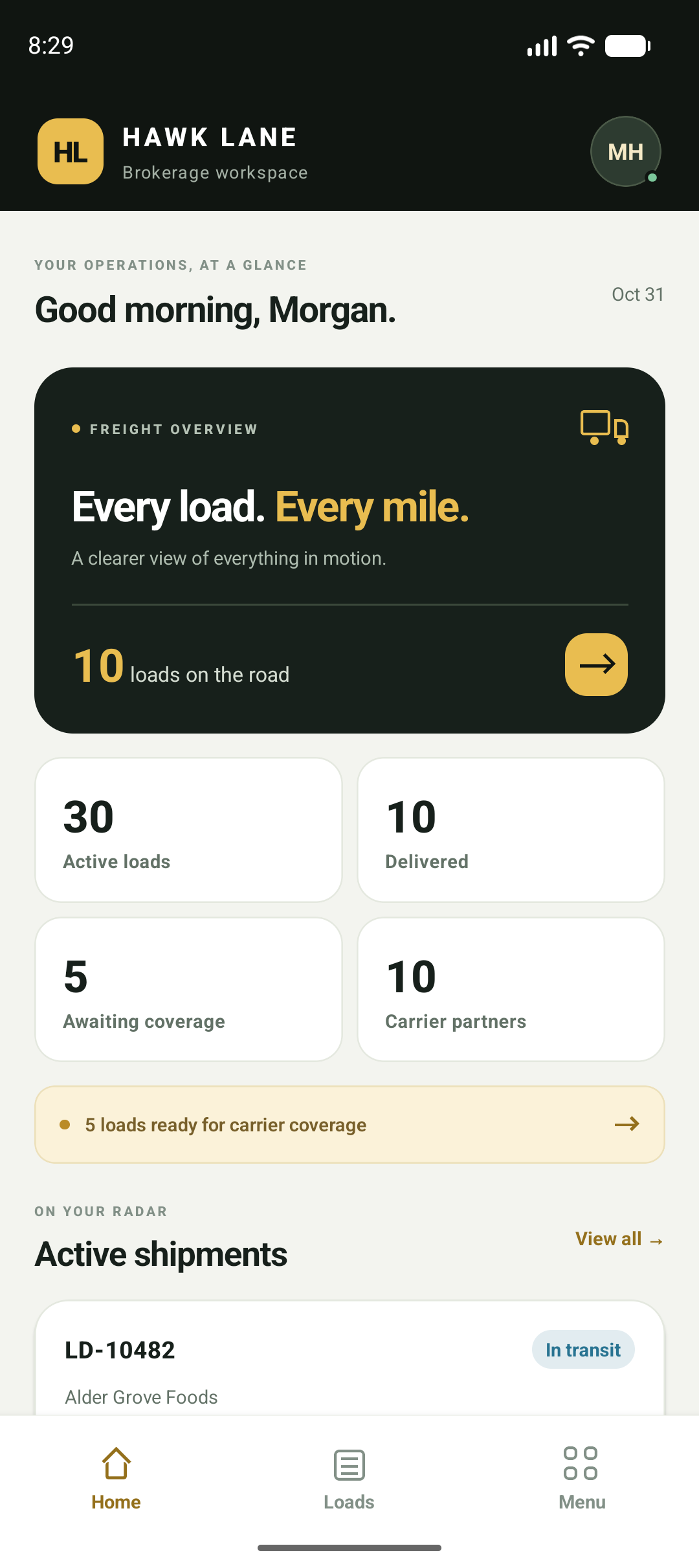
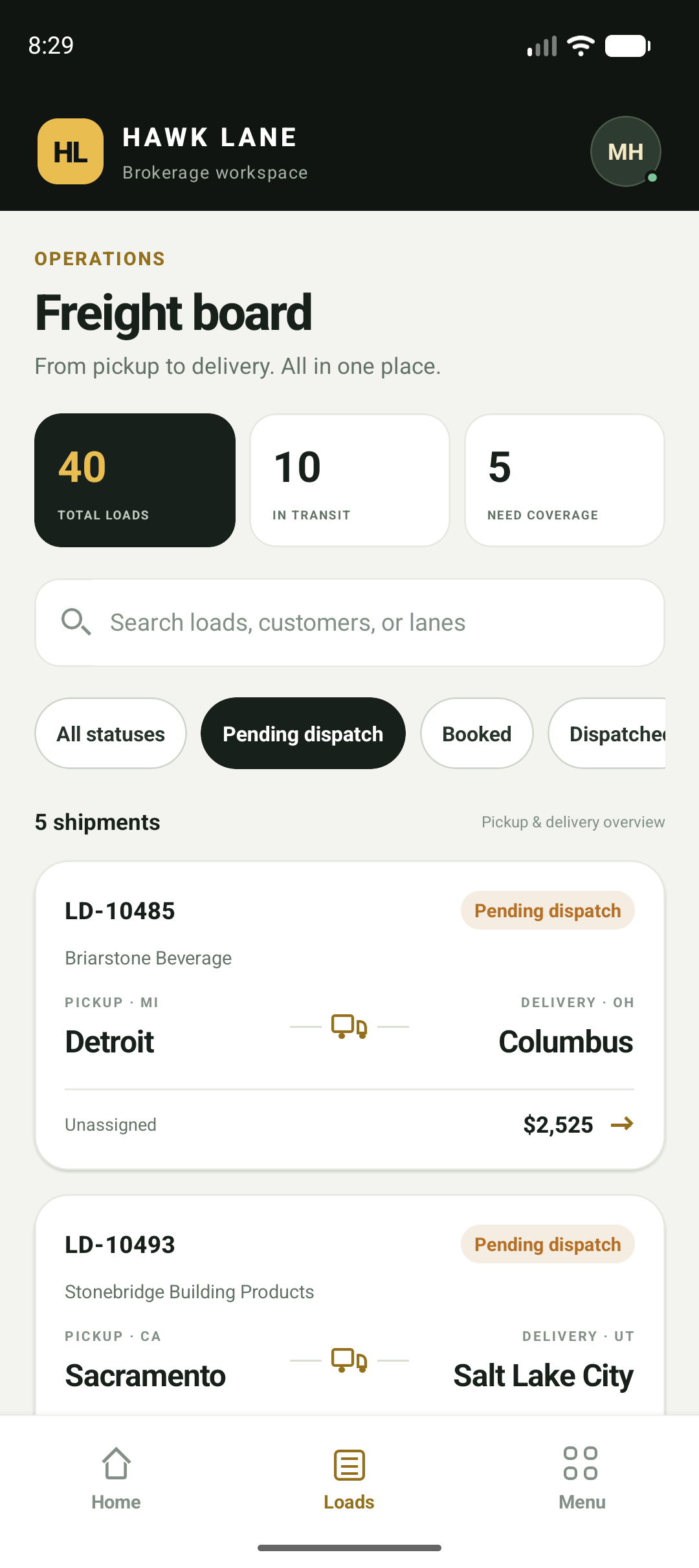
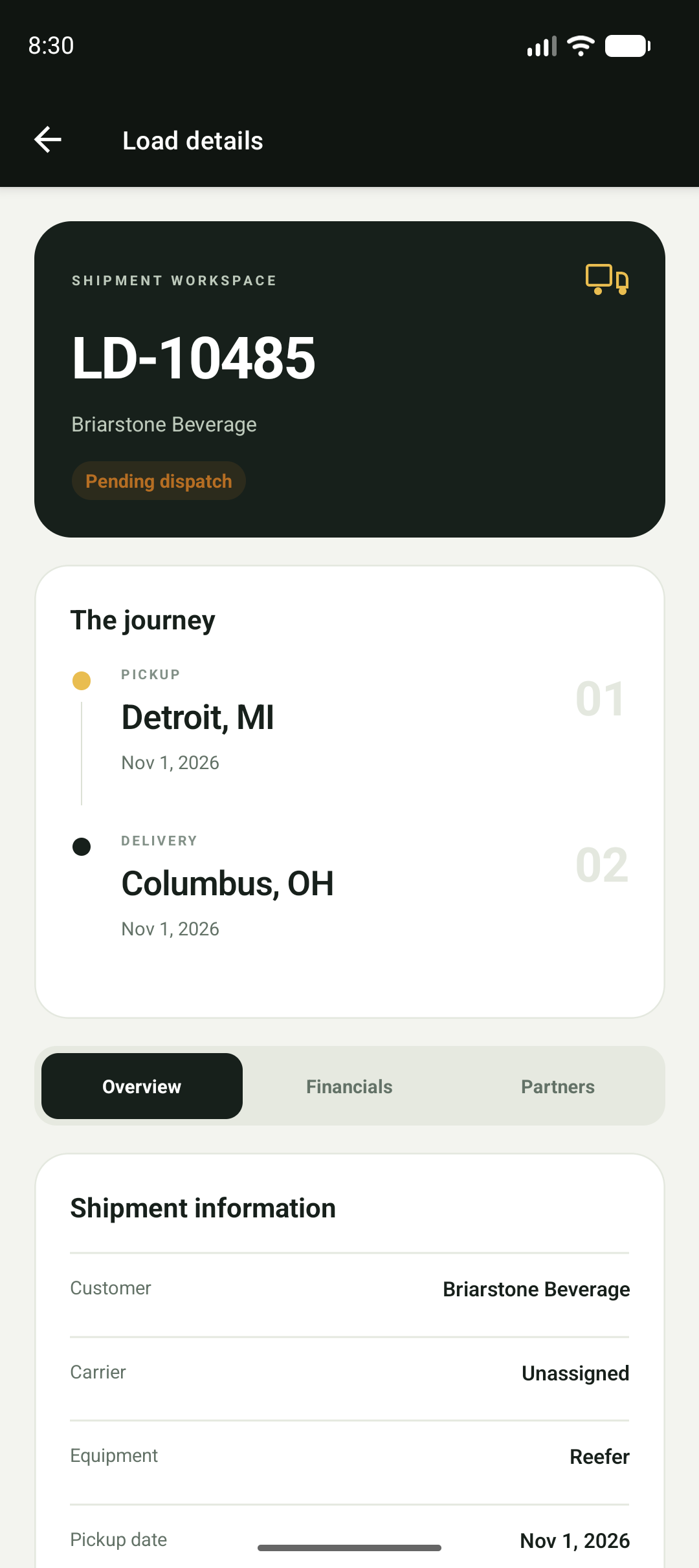
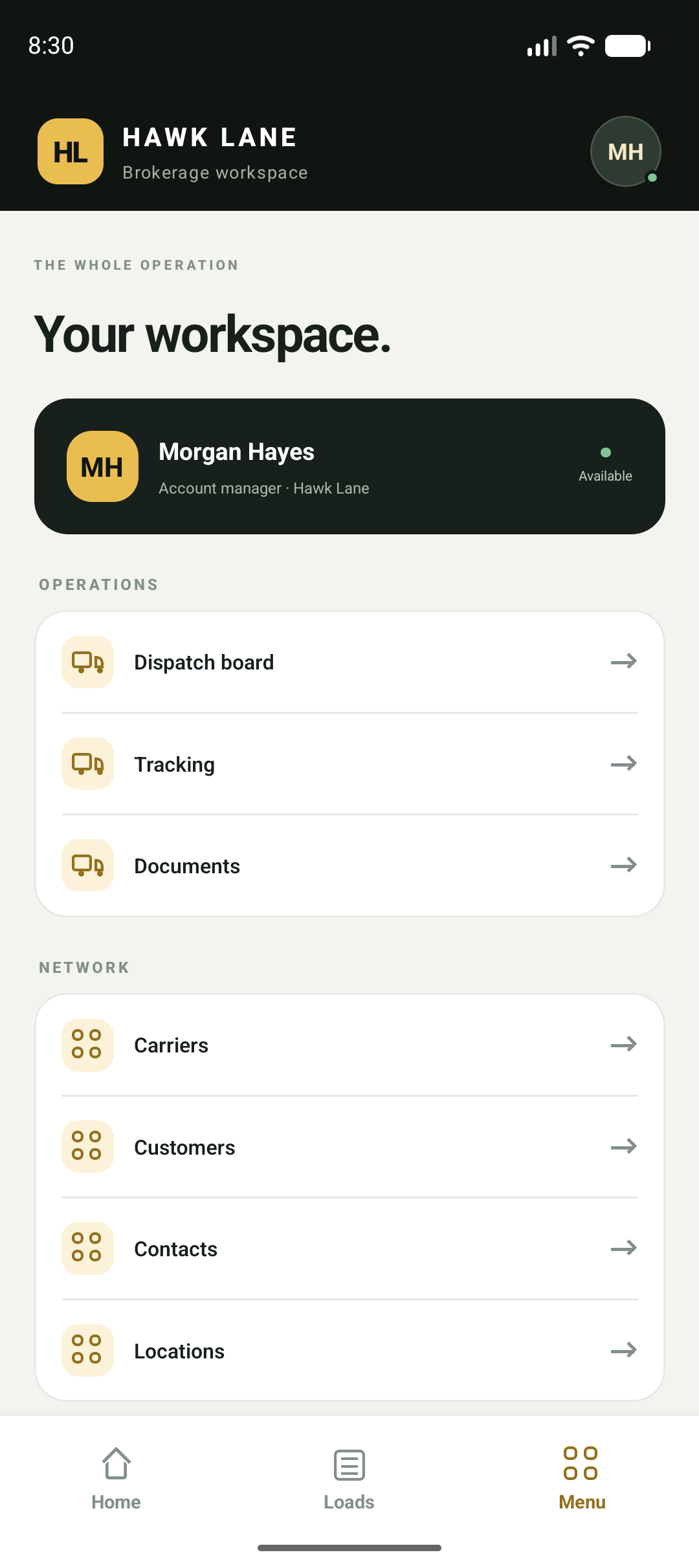
Explore the Broker TMS web workspace and mobile app: loads, customer records and the information your brokerage checks through the day. Screens supplied from Hawk Lane Broker TMS; displayed records and figures are examples, not customer results or plan limits. Click any screen to enlarge.

Personal Setup, Built Around Small Brokerages

Hawk Lane configures the company, users and carrier profiles with you, and we recommend starting with a controlled group of loads before moving your full brokerage. A historical move from spreadsheets is reviewed from a sample export and quoted; it is not an automatic transfer of every row. The free plan covers 1 user and up to 10 loads a week.

  1. 1

    Request access to get started

  2. 2

    Tell us how your brokerage currently quotes and covers loads

  3. 3

    We configure your company, users, and carrier basics

  4. 4

    Start with a small number of real loads

  5. 5

    Receive direct support as your team adopts the system

Support is available in English, Hindi and Punjabi. Reach us at (626) 750-0970 or support@hawklanetech.com — 30 N Gould St Ste N, Sheridan, WY 82801.

Freight Broker TMS Software Pricing

Hawk Lane keeps freight brokerage software pricing simple: start free, pay per user when you need more users or more loads, and add QuickBooks or driver app tracking only if you need them. Prices are in USD.

Free Broker TMS: $0

For 1 user and up to 10 loads a week. Quote, cover, attach documents, invoice customers and review load margin.

Broker TMS Pro: $30 per user per month

Unlimited loads. Pay for the people who use it, so a single-user brokerage pays for one user and a larger team adds users as it grows.

QuickBooks Online: $50 per month

Optional add-on for Broker TMS Pro. Sends load-linked customer invoices to QuickBooks Online. Settlement amounts are not synced.

Driver app tracking: $3 per load

Optional. Track a load through the Hawk Lane driver app for $3 per tracked load. Tracking updates sync to that load in Broker TMS.

Standalone broker modules, EDI and other connections are reviewed and confirmed separately. QuickBooks Desktop is a Custom review. Third-party providers may charge their own fees. Founding Broker Program customers may qualify for early-access pricing.

Get Free Access

Frequently Asked Questions

It is designed for freight brokerages and 3PLs — from single-user agencies to established operations — that want to replace texts, spreadsheets, and load-board-only workflows with a clearer way to quote, cover, bill, and track margins.

Freight broker TMS software is a transportation management system built for brokerages instead of asset-based carriers. It keeps the customer quote, the covering carrier, the rate confirmation, load documents, the customer invoice and the load margin on one load record. Hawk Lane Broker TMS is a cloud-based TMS for freight brokers and 3PLs that runs in a web browser.

Yes. Broker TMS supports single-user use. The Free plan covers 1 user and up to 10 loads per week. On Broker TMS Pro, a one-person brokerage pays $30 per month for one user with unlimited loads and adds users only when the team grows.

Yes. 3PLs that broker freight can use Hawk Lane Broker TMS to quote customers, cover loads with carriers, keep load documents, invoice customers and review load margin. Pricing is the same as for freight brokerages.

Yes. Broker TMS saves customer and carrier history: contacts, past loads, recorded rates and documents stay with each record. Small brokerages use it for CRM-style record keeping inside the load workflow instead of a separate tool.

Yes, as an option. Tracking a load through the Hawk Lane driver app costs $3 per tracked load, and the tracking updates sync to that load in Broker TMS. Loads you do not track carry no tracking fee.

Yes. Hawk Lane Broker TMS modules can operate independently. Tell us whether you need carrier records, load-status records, document collection, customer invoicing or margin tracking. We will confirm the module scope, setup, price and any connection to your current system before you start. Standalone access has separate terms from the Free Broker TMS offer.

This landing page is focused on freight brokers. Hawk Lane also offers a Simple Carrier TMS for asset-based fleets.

Yes. Hawk Lane offers a Free Broker TMS plan for 1 user and up to 10 loads per week. When you need more users or more loads, Broker TMS Pro is $30 per user per month with unlimited loads.

Yes. Founding Broker Program customers receive assisted onboarding and help setting up your Hawk Lane Broker TMS account — including company, users, carrier profiles, and operational basics.

Yes. Keep carrier onboarding details, packets, insurance documents, saved lanes, past work and your team's ratings in the carrier record. Find an existing carrier and review the history your brokerage saved before another booking. Your team still confirms current availability, authority, insurance and paperwork.

Yes. Broker TMS generates the rate confirmation from the load and emails it to the carrier. The rate confirmation, BOL and POD stay with the load record. Reading an incoming rate confirmation into a reviewed draft is a separately quoted workflow, not part of the free plan.

Yes. When a load is covered, Broker TMS generates the rate confirmation from the load details (customer, lane, carrier and agreed carrier rate) and emails it to the carrier. The rate confirmation stays on the load record with the BOL and POD, so brokers do not need separate rate confirmation software.

Broker TMS is built to help you see margin and performance more clearly as you quote, cover, and bill loads.

No. MC and DOT numbers are optional. Canadian and other brokerages can still request Free access without those numbers. We regularly receive spam requests, so we verify some of the details you submit only to confirm the request is genuine. That check is spam protection only.

Free Broker TMS covers 1 user and up to 10 loads per week at no cost. Broker TMS Pro is $30 per user per month with unlimited loads. On Pro, the QuickBooks Online connection is an optional $50 per month add-on. Driver app tracking is optional at $3 per tracked load. Prices are in USD. Carrier TMS prices are not the broker price. Founding Broker Program customers may qualify for early-access pricing.

Submit the short form with your name, typical weekly loads, business email and phone. The Hawk Lane team will contact you to start Free access.

Yes. Broker TMS sends load-linked customer invoices to QuickBooks Online. The QuickBooks Online connection is a $50 per month add-on on Broker TMS Pro and is not part of the Free plan. Settlement amounts are not synced. Customer and carrier details stay in Hawk Lane. QuickBooks Desktop is a Custom review.

Before and after Hawk Lane Broker TMS

Before Hawk Lane

  • Quotes and covers in spreadsheets
  • Carrier updates in text threads
  • RateCons scattered in email
  • Margin tracking in notebooks
  • Manual customer invoicing
  • Load-board-only workflow

With Hawk Lane

  • Quote, cover, and bill in one place
  • Preferred-carrier profiles and load status
  • Documents attached to each load
  • Clearer margin visibility
  • Connected billing workflow
  • Less chaos between load boards

Ready to Replace Spreadsheets With a Simpler Broker TMS?

Hawk Lane helps you scale your brokerage. When quotes, carriers, documents, and margin are in the right place and moving in the same direction, you have a clear view of the book and a foundation you can grow from.

Keep your customer quote, covering carrier, documents, customer invoice and load-level margin together. Tell us your typical weekly loads to start with the right broker setup.

Get Free Broker TMS Access →

Free plan: 1 user, up to 10 loads a week. No credit card required.