Loads tracked in spreadsheets
Dispatch details scatter across sheets, texts and notebooks.
Trucking TMS Software
Hawk Lane trucking TMS software connects dispatch, loads, drivers, trucks, trailers, documents, PODs, invoicing, settlements and customer updates in one TMS platform.
Practical TMS for trucking companies that operate their own equipment and want to avoid enterprise complexity. Hawk Lane TMS is available to Canadian trucking companies. Tell us about your fleet and the dispatch, document and billing workflows you need. Plan prices linked from this page are in US dollars (USD).
Free plan available for up to 3 trucks · No desktop download · Guided setup available on paid plans
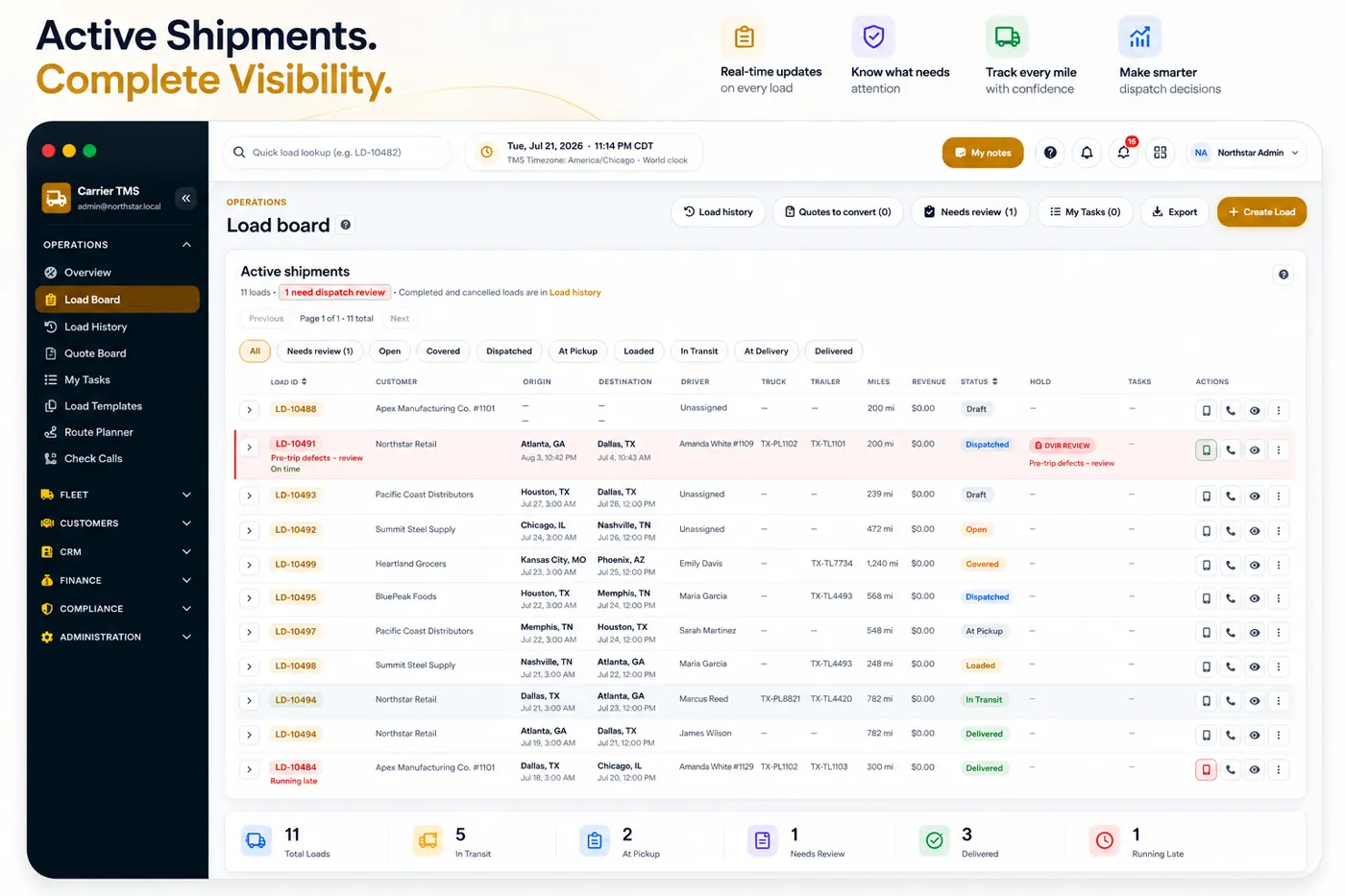
A trucking TMS—also called a trucking management system—connects dispatch, drivers, equipment, documents, invoicing and settlements. The office gets one operational record from booking through delivery and billing instead of separate spreadsheets and message threads. Carriers who want plans, screenshots, and access for running their own trucks should start on the Carrier TMS page.
Carriers search for this category under half a dozen different names. Most of them describe the same thing from a different angle, and a few describe something else entirely.
| What people search for | What it usually means |
|---|---|
| Trucking software | The broadest term. Can mean a TMS, accounting, ELD or maintenance software — worth clarifying before comparing products. |
| TMS system for trucking | The operating system for a carrier: loads, dispatch, drivers, equipment, documents, billing. |
| Transportation management system for trucking | The formal name for the same category. Enterprise vendors use it more often than small fleets do. |
| Trucking dispatch software | The dispatch portion of a TMS. See trucking dispatch software. |
| Fleet TMS or TMS fleet management | The same system viewed from equipment and driver management. See fleet TMS software. |
| TMS app for owner-operators | A lighter mobile app for 1–2 truck operations. If you are an owner-operator or run fewer than 3 trucks, you can use the TMS App. |
| Load board | A freight marketplace — a different product. Hawk Lane is not a load board. |
| ELD or GPS tracking | Compliance and telematics hardware, not a TMS. These can connect to a TMS through integrations. |
Hawk Lane sits in the middle row: a transportation management system for trucking companies that run their own trucks.
Dispatch-only software assigns trucks and tracks stops. A trucking TMS still does that, then keeps documents, settlements and invoicing on the same load so the office is not rebuilding the week in another tool.
Small trucking companies often start with spreadsheets, phone calls and email. That can work for a few loads, but as the fleet grows, important details become harder to track.
Dispatch details scatter across sheets, texts and notebooks.
Repetitive check calls eat dispatcher time.
Paperwork lives in email, camera rolls and message threads.
Billing waits when delivery documents are hard to find.
Pay, advances and deductions become slow and error-prone.
Status calls pile up when customers cannot see shared load info.
A trucking TMS gives your team one place to manage the daily operation.
Trucking TMS systems help carrier companies manage freight from booking through delivery and billing. A useful TMS for trucking operations is not only a dispatch board—it also connects drivers, equipment, documents, customers, invoices, settlements and reporting.
Hawk Lane is a carrier TMS for small fleets — practical cloud software for asset-based trucking companies, not a load board or broker marketplace. For product fit by truck count, see TMS for small carriers.
One load flows from booking through delivery, documents, billing and settlement in a structured TMS workflow.
Capture customer, lane, rate and appointment details.
Assign driver, truck and trailer to the load.
Share pickup and delivery details with the team.
Record status updates as the load moves.
Collect POD, BOL and supporting paperwork.
Bill from the completed load record.
Prepare driver settlement on paid plans.
Review revenue, cost and margin by load.
AI Dispatcher available
When tenders still arrive as PDFs, spreadsheets, mailbox messages or voice, AI Dispatcher can prepare a reviewable draft load instead of retyping the same customer, lane and rate into the TMS. OCR and document intelligence read supported files; a dispatcher still accepts the draft before it is live. This is a separately quoted add-on, not part of the monthly trucking TMS plan. See automated load entry and document workflows.
Practical modules for small fleets — with clear notes on what Free includes versus Growth, Pro and Custom.
Keep load details, stops, appointments, equipment, documents and status updates organised in one place.
Trucking dispatch software details →
Give drivers a simple way to view assigned loads, send updates and upload documents without relying only on phone calls or scattered messages.
Driver App is included in Growth, Pro and eligible Custom plans — not Free.
Store key documents directly with the load record so your team does not have to search through emails, folders and message threads.
Hawk Lane helps connect delivery documents, load revenue, expenses and driver payments so billing and settlements are easier to manage.
Driver settlements are a paid-plan feature. See driver settlement software.
For growing fleets, customer access can reduce repetitive status calls and help customers view shared load information, documents and invoices.
Customer Portal is included in Growth, Pro and eligible Custom plans.
Manage core fleet records and reminders so your operation has better visibility into equipment, drivers and document expiry.
Hawk Lane helps organise records — it does not guarantee legal compliance or file authority for you.
Company pricing by active truck count. Full comparison lives on the Carrier TMS pricing page.
$0/month
Up to 3 active trucks
Core web TMS, loads, dispatch, documents, PODs and basic invoicing.
Request Free AccessFree carrier TMS plan details →
$99/month
Up to 10 active trucks
Driver app, customer portal, settlements, reporting and guided initial setup.
Request Access$199/month
Up to 20 active trucks
Advanced reporting, priority onboarding, one standard migration and one supported standard integration.
Discuss Pro SetupQuickBooks TMS integration on supported Pro setups.
Quote
21+ trucks or complex scope
Multiple integrations, EDI, custom workflows or larger migration needs.
Request Custom PlanNeed work beyond a quoted SaaS plan? See custom transportation management system development.
Plan limits and included services may vary during launch. Final setup, migration and integration requirements are confirmed before activation. Switching from another TMS or spreadsheets? Ask about data migration. Share a sample export and we'll confirm what can be imported, the timeline and any setup cost before you switch.
| Need | Hawk Lane TMS |
|---|---|
| Small carrier dispatch | Yes |
| Driver updates | Yes, paid plans |
| POD and documents | Yes |
| Customer portal | Paid plans |
| Driver settlements | Paid plans |
| Load-level profitability | Yes |
| Freight broker workflow | Separate product — freight broker TMS |
| Load board marketplace | No |
| Government authority filing | No |
Hawk Lane is independent cloud-based trucking software. It is not a load board, freight marketplace, FMCSA service, or government filing provider.
A trucking management system is a TMS platform that helps an asset-based carrier connect loads, dispatch, drivers, equipment, documents, PODs, settlements, invoicing, and reporting in one operational workflow.
TMS stands for transportation management system. In trucking, a TMS system is the software a carrier uses to run booked freight — dispatch, drivers, equipment, documents, invoicing and settlements — as opposed to an ELD, a GPS tracking tool, or a load board.
No. Dispatch software for trucking carriers focuses on assigning and tracking loads, drivers, and equipment. A trucking TMS includes dispatch but also connects documents, billing, driver settlements, reporting, and other back-office work.
Yes. Hawk Lane Carrier TMS is cloud-based and accessed through a supported web browser. No desktop download is required.
Yes. A small fleet can use a TMS to replace spreadsheets and connect dispatch, documents, PODs, invoicing, and reporting. Hawk Lane offers a Free Carrier TMS plan for carriers with up to 3 active trucks.
Start free for up to 3 trucks. Upgrade when you need the driver app, customer portal, settlements, and guided setup.
Request Free Access →No credit card required during the pilot. Cloud SaaS in your web browser.