Load Pay
Prepare driver pay from load rates, miles, and trip details already stored on each load — less copy-paste from dispatch sheets.
Standalone driver settlements
Review completed loads, driver pay, advances, deductions and expenses in one settlement workflow. Use Hawk Lane driver settlements independently without adopting the full Carrier TMS, or alongside dispatch and invoicing in the suite.
Ask about standalone scope, setup and pricing for your fleet. Full Carrier TMS plan prices are separate from standalone access.
Use the settlement workflow on its own, or choose Carrier TMS when you also need dispatch, documents and invoicing.
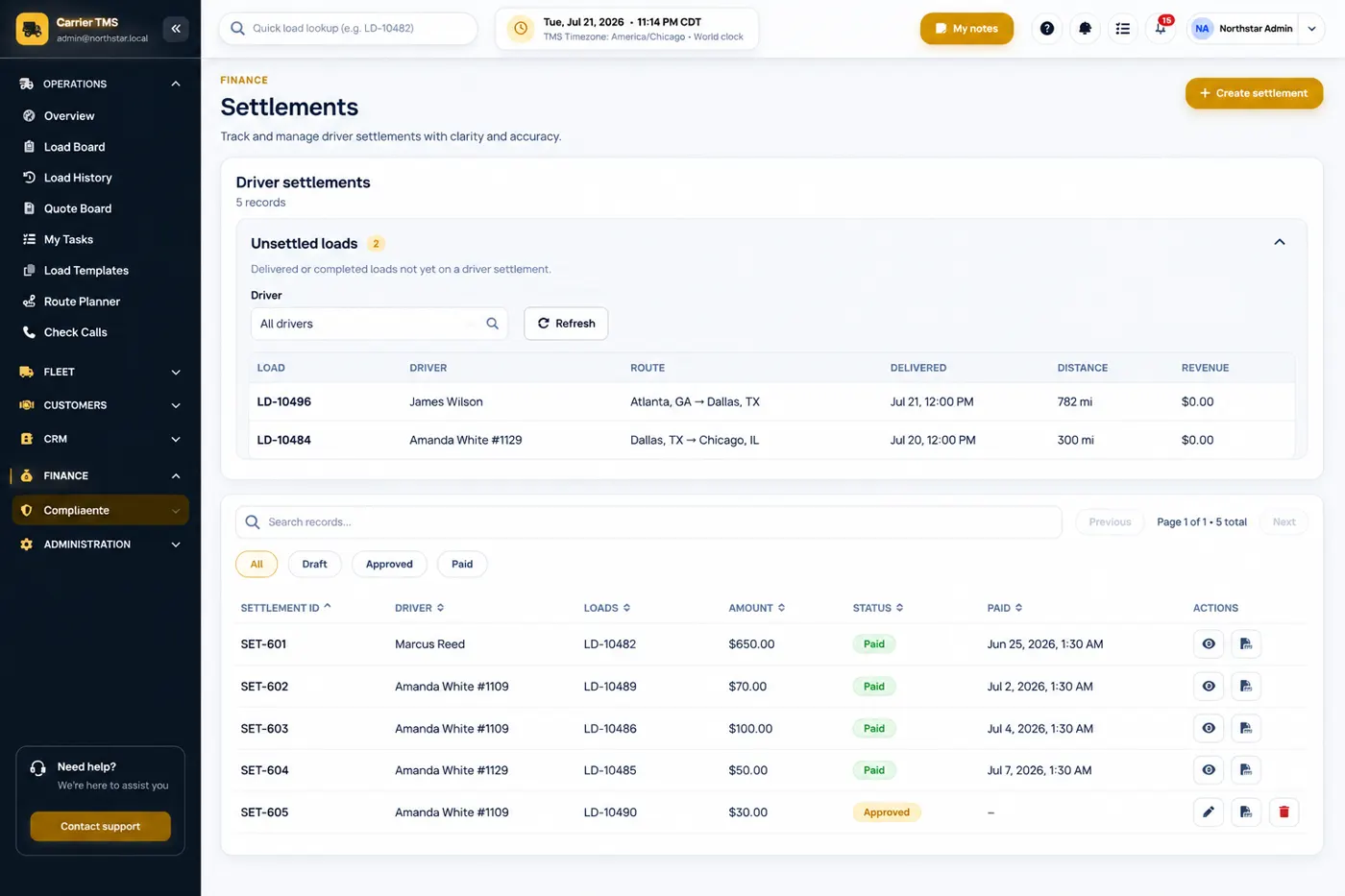
Driver settlement software brings completed loads, pay, advances, deductions and expenses into one reviewed pay-period record. Hawk Lane offers the workflow independently and within Growth, Pro and Custom Carrier TMS plans. Ask about standalone access, or compare full Carrier TMS plans.
Keep an advance with the completed loads and adjustments it belongs to, then review the settlement before finalising driver pay. Staff can check advances, deductions, expenses and prior settlement history in the same platform. Outstanding balances are tracked each period; they are not carried forward automatically.
Pay drivers per load, or hourly or day-rate on Growth, Pro and Custom. Hours come from the driver's login and logout times in the app — session time, not hours-of-service or ELD tracking. That suits hourly or day-rate work such as oilfield hauling. Hawk Lane does not file payroll taxes or send bank payments.
Preparing hourly or day-rate driver pay? Use our hourly and day-rate settlement worksheet New to settlements? Read how to manage driver advances and settlements in one place, or compare trucking payroll software vs driver settlement software. to organise reviewed time, rates, advances and adjustments.
Practical settlement tools for dispatchers and back-office staff — fewer manual steps from delivered load to driver pay.
Prepare driver pay from load rates, miles, and trip details already stored on each load — less copy-paste from dispatch sheets.
Apply recurring or one-time deductions — insurance, escrow, equipment, or other fleet-specific items — before you finalize pay.
Track driver advances and outstanding balances through each settlement period.
Include fuel, tolls, lumper fees, and other trip expenses in settlement preparation so drivers see a complete picture.
Review prior settlement periods, compare pay, and answer driver questions without searching email or old spreadsheets.
When you use the full Carrier TMS, settlement data stays linked to loads, documents and invoicing in one workspace. Completed assignment and check calls live on trucking dispatch software before pay is prepared.
No. Driver settlements and settlement history stay in Hawk Lane. The QuickBooks Online integration sends load-linked customer invoices on Pro when QuickBooks Online is selected as the one standard integration, or on eligible Custom plans. It does not sync settlement amounts or send driver payments.
Standalone access does not imply an accounting connection. If you also need the full Carrier TMS and customer-invoice sync, discuss Pro or Custom. Compare the plan limits and included features.
Staff start from loads that are already delivered, review the settlement, and keep that record. Hawk Lane organises these records. It does not file payroll taxes, send a bank payment, or replace your accountant.
This example shows the existing Carrier TMS workflow. For standalone use, tell us where your completed-load and driver-pay records are held today. We will confirm supported inputs, outputs, setup and any connection needed before you start; compatibility with your current TMS is not assumed.
For standalone settlements, ask us to confirm the workflow, onboarding and price for your fleet. No standalone price or instant signup is published here. The plans below are full US Carrier TMS subscriptions, not standalone settlement prices.
The Free plan ($0/month, up to 3 trucks) includes dispatch, documents, and basic invoicing but not driver settlements. See Carrier TMS plans for full comparison.
It is for trucking carriers that pay company drivers or owner-operators and need to review load pay, deductions, advances and settlement history. Use the settlement module independently, or within the full Carrier TMS.
Driver settlements are included on Growth, Pro and Custom Carrier TMS plans. Free Carrier TMS does not include settlements. Standalone access has separately confirmed scope, pricing and entitlements.
Yes. Settlement preparation uses load and trip information already in Carrier TMS so pay is tied to the loads drivers actually ran instead of manual re-entry.
Yes. Growth and above include advances, recurring or one-time deductions, and expense handling so settlement totals reflect what drivers owe and what the company owes.
Yes. Settlement history is stored in Hawk Lane so you can review prior periods, compare pay, and answer driver questions without digging through email or spreadsheets.
Yes. The driver settlement module can operate independently without adopting the full Carrier TMS. Ask us to confirm your workflow, supported inputs and outputs, setup, pricing and any connection to your existing system. Full Carrier TMS plan entitlements do not automatically apply to standalone access.
No. Driver settlement amounts and history stay in Hawk Lane. QuickBooks Online integration sends load-linked customer invoices on Pro when selected as the one standard integration, or on eligible Custom. It does not sync settlements or send driver payments.
Standalone pricing is confirmed after reviewing your workflow and setup needs. Full Carrier TMS subscriptions include settlements on Growth at $99/month for up to 10 trucks, Pro at $199/month for up to 20 trucks, and Custom by scope. Those are suite prices, not standalone module prices. Free Carrier TMS does not include settlements.
For standalone settlements, contact Hawk Lane with your current pay process, fleet size and the workflow you need. We will confirm scope and commercial terms. If you need the whole suite, create a free Carrier TMS account and upgrade for settlements.
Hawk Lane helps you scale your business. When loads, pay, and documents are in the right place and moving in the same direction, you have a clear view of the operation and a foundation you can grow from.
Tell us how you prepare driver pay today and which settlement workflow you need. We will confirm standalone scope, setup and pricing, or help you choose the full Carrier TMS.
Ask about standalone access →Standalone terms are confirmed separately. Full Carrier TMS includes settlements on Growth, Pro and Custom.