Active
Loads currently running — driver assigned, equipment committed, and stops in progress.
Trucking dispatch software
For small US carriers and dispatch teams: run dispatch from one browser-based workspace — assign drivers and equipment, track stops and check calls, collect PODs, and move loads into invoicing without juggling spreadsheets, texts, and paper folders.
Hawk Lane is dispatching software for trucking — a dispatch program for small asset-based US carriers, with a trucking dispatch board, dispatch control, and TMS scheduling on each load. Access it from any web browser — no desktop download.
Part of Hawk Lane Carrier TMS — free plan for up to 3 trucks; paid plans when you need driver app, customer portal, and guided setup.
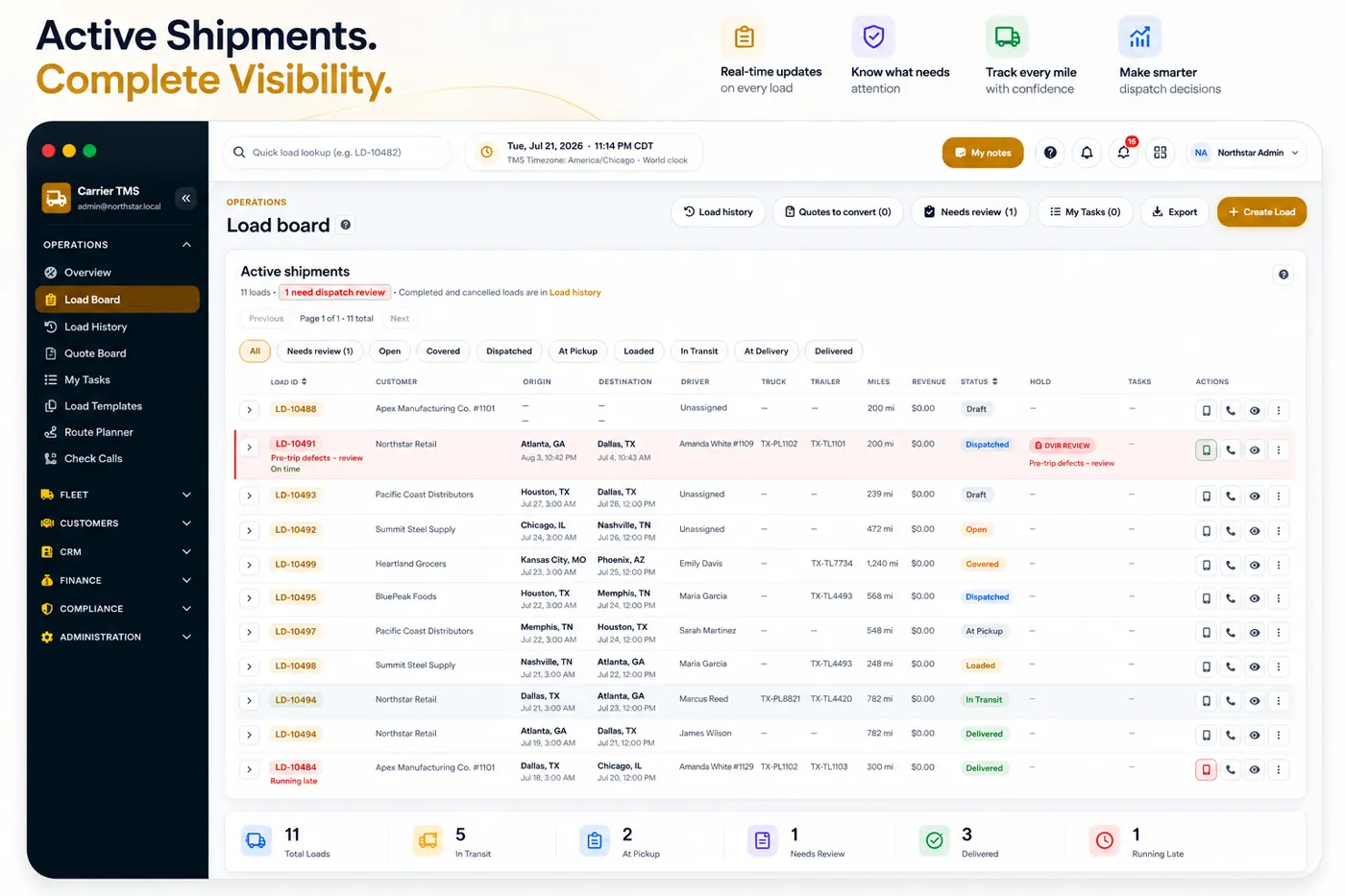
Trucking dispatch software is the daily workspace for small US carriers and their dispatch teams: assigning drivers, trucks, and trailers, tracking stops and check calls, collecting PODs, and handing completed loads to billing. Carriers searching for dispatching software for trucking or dispatch programs for trucking are usually looking for the same thing: a dispatcher board for freight they have already booked, not a marketplace of loads for sale. For an asset-based fleet, trucking company dispatch software should keep that operating workflow together without trying to replace the broader accounting, settlement, and reporting functions of a full TMS. Hawk Lane includes dispatch as part of Carrier TMS. If you are an owner-operator or run fewer than 3 trucks and mainly need a phone app rather than a dispatch board, you can use the TMS App.
The same load record carries the work from booking through delivery paperwork and billing. Free Carrier TMS covers this path for up to three trucks; paid plans add driver app, customer portal and settlements.
Hawk Lane gives small carrier fleets a dispatch board and back-office workflow in one place — loads, drivers, equipment, documents, and billing connected from booking to invoice.
Trucking dispatch boards are the working list of every load your fleet is responsible for, grouped by where each load stands right now. Dispatchers often call the same view a dispatcher board or a TMS dispatch board — it is the same screen, not a different product. It shows which loads are active, which are upcoming, which have delivered, and which are completed and ready to bill — with the assigned driver, truck, and trailer visible on each one. In Hawk Lane, trucking dispatch boards are a live view of your own booked freight, not a marketplace of freight for sale.
Loads currently running — driver assigned, equipment committed, and stops in progress.
Booked freight waiting on a pickup appointment, so planners can see tomorrow before it arrives.
Freight that has been dropped but still needs POD or supporting paperwork attached.
Documented loads ready to invoice and to feed driver settlements on paid plans.
These two terms get used interchangeably, and they should not be. A freight load board helps a carrier find available freight. A dispatch board — the core of truck dispatch software — manages what happens after a load is booked. Hawk Lane is the second one: it is not a load board or freight marketplace.
| Load board | Dispatch board in carrier dispatch software |
|---|---|
| Searches or posts available freight | Creates and manages booked loads |
| Helps source freight or capacity | Assigns drivers, trucks and trailers |
| Shows freight offered by other companies | Shows only your own fleet's committed work |
| Does not run the carrier's internal workflow | Tracks stops, check calls, documents and status |
| One tool used before booking | Connects dispatch to POD collection and invoicing |
For the broader workflow around dispatch, documents, settlements and reporting, see how a trucking TMS connects carrier operations, or how it looks across a whole fleet in fleet TMS software.
Another common mix-up. A dispatching service is people you hire; dispatch software is a system your own people use. Some carriers use both, and the two are not substitutes.
| Truck dispatching service | Trucking dispatch software |
|---|---|
| An outside company books and coordinates loads for you | Your team books and coordinates loads in your own system |
| Usually charged as a percentage of load revenue or a weekly fee | Flat company subscription based on active truck count |
| Load history and customer relationships often sit with the service | Load history, documents and customer records stay in your account |
| Scales by adding more agent hours | Scales by adding trucks and users to the same workflow |
Hawk Lane sells software. We do not book freight, negotiate rates, or act as a dispatching service on your behalf.
Dispatching software for trucking is the program your own team uses after a load is booked. Dispatch programs for trucking are the same idea: software you log into, not a dispatching service that books freight for a cut of revenue.
Assignments, status, documents and billing stay in your account. An outside dispatching service keeps that work — and often the customer history — on their side of the desk.
Dispatch programs for trucking manage freight you already have. They are not load boards. Hawk Lane does not post or buy freight; it runs the loads you enter.
Hawk Lane does not sell a separate dispatch SKU. Dispatching software for trucking is part of Simple Carrier TMS, on the same plans as documents, invoicing and settlements.
Dispatch control is seeing and changing what is happening on booked freight from one board. TMS scheduling in Hawk Lane means the pickup and delivery windows already stored on the load — not a separate routing product.
Who is assigned, which truck and trailer are committed, load status, and what still needs a check call or document. That control lives on the dispatch board and the load record.
Pickup and delivery appointments, appointment windows, and stop instructions stay on each load so dispatch and drivers share the same plan. That is TMS scheduling here — times and stops on the record, not a new module.
Hawk Lane does not include automatic route optimisation or AI auto-scheduling. Dispatchers still assign drivers and confirm appointments. Status updates come from check calls, documents and supported telematics when connected.
AI Dispatcher available
Optional Hawk Lane automation can send configured load assignments, pickup and delivery details, status updates or document requests to an approved Microsoft Teams channel or WhatsApp recipient. The TMS remains the load record while the dispatch information reaches a channel your team or driver already monitors.
This is a separately quoted AI Dispatcher workflow. Supported message types, recipients, permissions and any reply-to-TMS actions are confirmed during setup. For inbound rate cons, CSVs, email, voice and OCR on supported documents, see Microsoft Teams and WhatsApp dispatch workflows.
Trucking dispatch boards should show what is moving today, what is booked for tomorrow, and what still needs paperwork — without opening five spreadsheets or scrolling through group texts.
Active, upcoming, in-transit, delivered, and completed loads on a clear dispatch board so your team knows what needs attention.
Customer, broker, lane, rate, equipment type, pickup and delivery appointments, and notes stay on the load — not scattered across tools.
Reduce repeated where-is-my-truck calls with clearer load status for dispatch, operations, and customers on supported plans.
Know who is running each load and which equipment is committed — without cross-checking a whiteboard, notebook, and driver text thread.
Assign the right driver to each load and keep contact details and load responsibility organized in one workspace.
Tie trucks and trailers to loads so dispatch and safety teams can see which units are on the road and which are available.
On Growth and above, drivers can see assigned loads, upload documents, and send updates from the driver app.
Pickup and delivery appointments, stop details, and check-call notes belong on the load — not in a dispatcher's personal notes app.
Store addresses, appointment windows, and stop instructions so drivers and dispatch are aligned before wheels roll.
Log status updates and check calls on the load so the next dispatcher on shift does not start from zero.
When load progress is visible in dispatch, your team spends less time answering the same where-is-the-truck questions.
Rate confirmations, BOLs, PODs, lumper receipts, and other paperwork stay with the load they belong to — ready for billing and audits.
Keep freight documents organized by load instead of buried in email threads, camera rolls, or shared drives.
Drivers can upload PODs from the road on supported plans, or your office team can attach signed paperwork when it arrives.
When PODs and supporting documents are on the load, invoicing does not wait on a scavenger hunt through inboxes.
Dispatch decisions should flow into billing and driver pay — not get re-keyed into another spreadsheet at the end of the week.
Prepare invoices faster using organized load rates, delivery confirmation, and documents already on the load record.
Calculate driver pay, advances, and deductions with load history in one system. Settlements are included on Growth, Pro, and Custom plans. After delivery, that pay work is covered on driver settlement software.
See load summaries and profitability views on paid plans so owners can understand dispatch performance without exporting to Excel.
Spreadsheets work until they do not — usually right when you add drivers, lanes, or back-office staff and nobody agrees which file is current.
Trucking dispatch software is included in Hawk Lane Carrier TMS. Start free for up to 3 trucks, or choose a paid plan when you need driver app, customer portal, settlements, and guided onboarding.
Free, Growth, Pro, and Custom plans are detailed on our Carrier TMS pricing page — company pricing based on active truck count, not per load.
It is designed for small asset-based carrier fleets — roughly 1 to 20 active trucks on standard plans — that need a dispatch board, driver assignment, check calls, documents, and invoicing in one workspace instead of spreadsheets and group texts.
A dispatch board is the working view of every load your fleet has booked, grouped by status — active, upcoming, delivered, and completed — with the assigned driver, truck, and trailer on each load. In Hawk Lane, TMS dispatch is part of Carrier TMS rather than a separate product.
No. A load board is a marketplace for finding available freight. A dispatch board manages the freight you have already booked — assignments, stops, check calls, documents, and the handoff to billing. Hawk Lane is not a load board or freight marketplace.
Hawk Lane is software. Your own dispatchers use it to run loads. A dispatching service is an outside company that books and coordinates freight on your behalf, usually for a percentage of load revenue. Hawk Lane does not book freight or negotiate rates for carriers.
Yes. Dispatchers can assign drivers and equipment to each load, see who is responsible for what, and keep assignment details tied to the load record so the back office has one source of truth.
Pickup and delivery stops stay on the load with appointment details. Check-call notes and status updates are recorded on the load so dispatch does not rely on scattered texts or phone notes.
Yes. Rate confirmations, BOLs, PODs, receipts, and other load documents can be attached to the correct load so billing and settlement teams can find paperwork without searching inboxes.
Yes. When loads, documents, and delivery status live in one system, invoicing moves faster and driver settlements are easier to calculate. Driver settlements are included on Growth, Pro, and Custom Carrier TMS plans.
Yes. Dispatcher board and dispatch board describe the same working view of booked freight — which loads are active, who is assigned, and what still needs a document or a check call. It is not a load board.
Dispatching software for trucking is a program your own dispatchers use to assign drivers and equipment, run a trucking dispatch board, and keep stops and documents on each load. Dispatch programs for trucking are the same thing. It is not a dispatching service that books freight for you. Hawk Lane is dispatching software included in Carrier TMS.
Dispatch control is the ability to see and change what is happening on booked freight: who is assigned, which truck and trailer are committed, load status, and what still needs a check call or document. In Hawk Lane that control lives on the dispatch board and the load record, not in a separate product.
Yes, as appointment windows on the load. TMS scheduling in Hawk Lane means pickup and delivery times, stop instructions, and appointments stored on each load so dispatch and drivers share the same plan. It is not automatic route optimisation or AI auto-scheduling.
See how Hawk Lane helps small carrier fleets assign drivers, track loads, collect PODs, and move into invoicing from one browser-based workspace.
Request Free Access →Free plan for up to 3 trucks. No credit card required during the pilot.