Load and dispatch management
Create loads, assign work and see active trips in one place.
Small Carrier TMS Buyer Guide
Choosing the right TMS for a small trucking company is not just about having more features. The best fit should help your team manage dispatch, drivers, documents, PODs, invoicing, settlements and customer updates without adding enterprise-level complexity.
Hawk Lane is built for small asset-based carrier fleets that want a practical cloud TMS with clear plans, guided setup options and room to grow.
Free plan for up to 3 trucks · Growth plan for up to 10 trucks · No desktop download
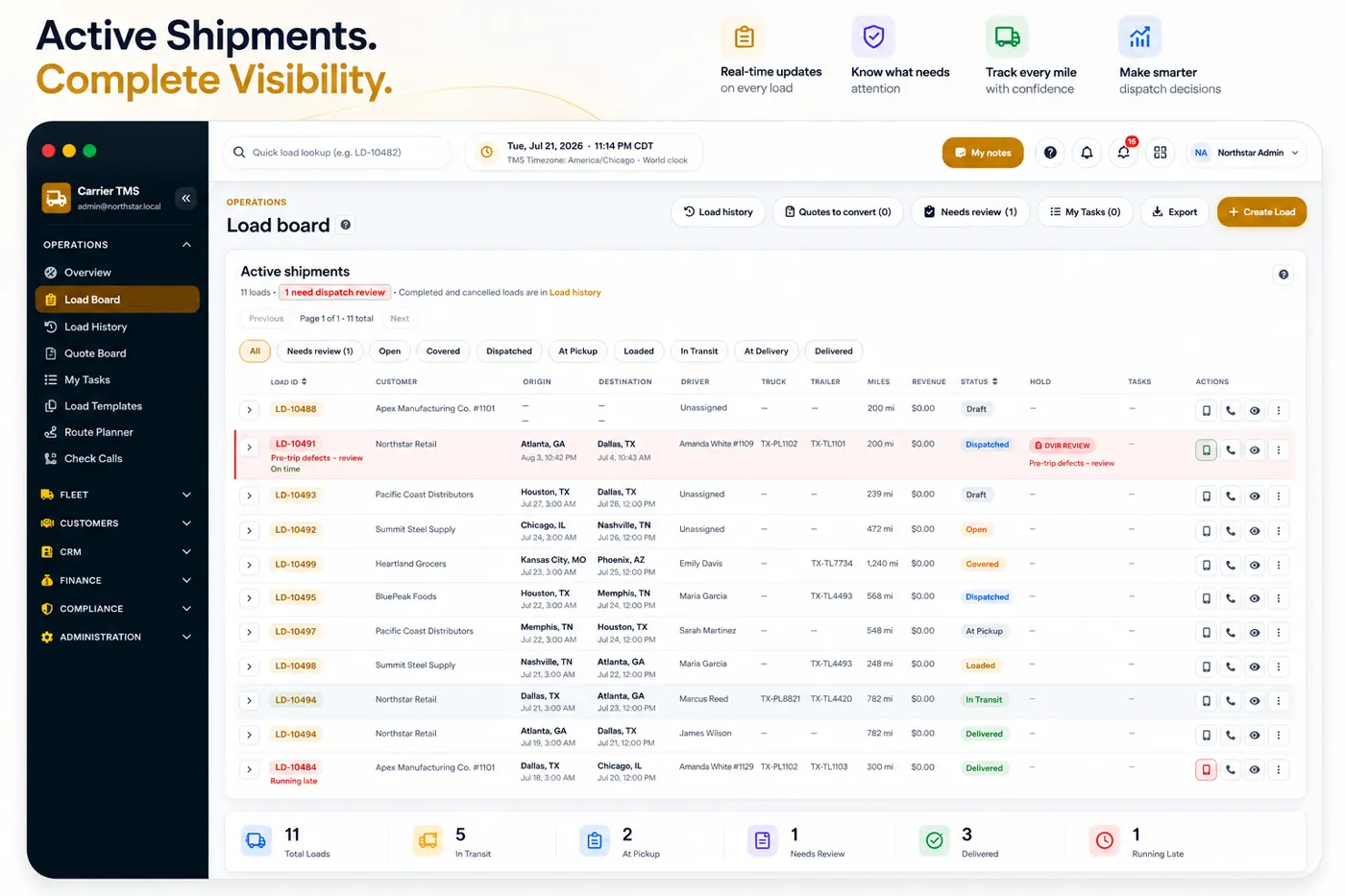
The best TMS for a small trucking company is one that covers daily dispatch, driver assignment, PODs, invoicing, and settlements without enterprise complexity. Hawk Lane is built for asset-based fleets of about 3–30 trucks, with a Free plan for up to 3 trucks and paid plans when you need a driver app, customer portal, or settlements. Request Free Access to try the Free plan.
A small carrier usually does not need a heavy enterprise system on day one. The first priority is to replace scattered spreadsheets, phone calls, text messages and email threads with one organised workflow.
Create loads, assign work and see active trips in one place.
Match equipment and drivers to each load without spreadsheet juggling.
Track milestones so the office knows where every load stands.
Keep rate cons, BOLs, PODs and receipts attached to the load.
Share status without constant phone calls for every check-in.
Bill from completed load data instead of rebuilding invoices by hand.
Manage pay, advances and deductions without spreadsheet math.
See revenue, cost and margin at the load level.
Get trucks, drivers and customers set up without a long project.
Clear plans that fit a small fleet today and scale as you grow.
The right TMS should help the carrier run today’s operation while supporting the next stage of growth.
Many tools focus on vehicles, GPS tracking, maintenance or accounting. Those tools can be useful, but a carrier still needs one operational system for loads, drivers, documents, billing and customer communication.
Hawk Lane is a carrier TMS for small fleets — practical cloud software for asset-based trucking companies, not a load board or broker marketplace. To see Hawk Lane for small carrier fleets by truck count, open the product-fit page.
Use this checklist when evaluating any small-carrier TMS — including Hawk Lane. Paid-plan notes call out Driver App, Settlements and Customer Portal where they apply.
Can the system create loads, assign drivers, manage stops, track appointments and show active work clearly?
Trucking dispatch software details →
Can drivers view assigned loads, update status and upload PODs without constant phone calls?
Driver App is included in Growth, Pro and eligible Custom plans — not Free.
Can the team attach rate confirmations, BOLs, PODs, receipts and other documents directly to the load?
Can customers see shared load status and documents without calling dispatch for every update?
Customer Portal is included in Growth, Pro and eligible Custom plans.
Can invoices be created from completed load data instead of rebuilding everything manually?
Can driver pay, advances, deductions and settlement history be managed without spreadsheet math?
Driver settlements are a paid-plan feature. See driver settlement software.
Can the carrier see revenue, cost and margin at the load level?
Can the system connect with accounting, telematics, EDI or other tools when the company is ready?
Integrations are available on supported paid plans. See QuickBooks TMS integration.
Is pricing clear and predictable, or does it grow unexpectedly with every user, driver or load?
Does the vendor help configure trucks, drivers, customers and workflows, or is the carrier left alone?
Guided onboarding is included on Growth, Pro and eligible Custom plans — Free is self-guided.
If the vendor offers PDF, email, voice or messaging automation, ask which formats are supported, whether a person still reviews drafts, and whether that work is included in the monthly plan or quoted separately. Hawk Lane's AI Dispatcher is a separately quoted add-on — see TMS workflow automation for how review-controlled drafts work.
If the first question is the daily board — assignment, check calls and documents — start with dispatch software for small carriers. If the question is the full carrier product, including billing and settlements, evaluate Hawk Lane Carrier TMS.
This is a list of system categories, not a claim that every category fits an asset-based small carrier. People comparing TMS options usually mix carrier TMS, freight broker TMS, shipper TMS, fleet tracking or telematics software, enterprise transportation management systems, and simple TMS apps for owner-operators. They share a name and they are not interchangeable — pick the type that matches who owns the trucks and who bills the customer.
Built for asset-based fleets that dispatch their own trucks and manage drivers, equipment, documents, settlements and customer billing. See Carrier TMS.
Built for freight brokerages that quote customers, cover loads with outside carriers, manage carrier records and track load-level margin. See freight broker TMS.
Built for companies buying transportation and coordinating freight across carriers, facilities, orders and shipping locations. Hawk Lane is not a shipper TMS.
Location and ELD tools answer where a truck is. A fleet TMS answers which load it is on, what paperwork is attached, and what to invoice. For the operations view, see fleet TMS software.
Built for larger or more complex organizations that may need multi-branch workflows, deep EDI, extensive integrations or custom implementation.
Lighter mobile TMS for 1–2 truck operations that need loads, documents, PODs, BOLs, receipts and expenses without a full fleet workflow. See the TMS app for owner-operators.
This is the single most common mismatch in small-carrier software buying. Both are called a TMS, and they are built around opposite questions: "where is my truck" versus "who will cover this load."
| Carrier TMS | Broker TMS |
|---|---|
| You own the trucks and employ or contract the drivers | You arrange freight for other people's trucks |
| Core records: trucks, trailers, drivers, loads | Core records: customers, carriers, loads, margin |
| Driver assignment and check calls | Carrier sourcing, vetting, and rate confirmations |
| Driver settlements and equipment costs | Carrier payables and load-level margin |
| PODs collected from your own drivers | PODs chased from third-party carriers |
| Hawk Lane Carrier TMS | Hawk Lane Broker TMS |
If you run both sides of the business, evaluate them as two workflows rather than trying to force one product to do both. For a deeper breakdown, see carrier TMS vs broker TMS.
Some long-standing trucking systems are still installed on an office computer or a local server. That choice affects cost, access, and how easily a second dispatcher joins.
| Consideration | Cloud TMS | Desktop or on-premise TMS |
|---|---|---|
| Access | Any supported browser, including from home or the road | Usually the office machine it was installed on |
| Upfront cost | Subscription, little or no hardware | Licence plus server or workstation cost |
| Updates | Applied by the vendor | Manual installs, often version-locked |
| Backups | Handled by the provider | Your responsibility |
| Adding a user | Invite within plan limits | May require another licence or install |
| Working offline | Requires a connection | Can run without internet |
Hawk Lane is cloud-based and accessed through a supported web browser. There is no desktop version and no offline mode.
For a small carrier, the best system is the one the team will actually use every day.
Hawk Lane may be a good fit if you are a small asset-based carrier that wants a simple cloud TMS for dispatch, documents, driver updates, invoicing, settlements and customer visibility.
Hawk Lane may not be the right fit if you need a large enterprise TMS with deep custom EDI, complex multi-branch workflows, advanced warehouse automation or a heavily customised implementation from day one.
If your company needs highly specialised enterprise workflows, a custom implementation or multi-system integration project may be required.
Company pricing by active truck count: Free $0/month up to 3 trucks, Growth $99/month up to 10, Pro $199/month up to 20, and Custom quoted for larger fleets. This page is an evaluation guide — the complete plan comparison is on TMS software pricing.
A neutral buying checklist — not a named competitor comparison.
| Feature / Buying Factor | Why It Matters | Hawk Lane |
|---|---|---|
| Load and dispatch management | Keeps daily operations organised | Yes |
| Driver app | Reduces calls and manual updates | Growth and above |
| Customer portal | Improves customer visibility | Growth and above |
| POD and document storage | Speeds billing and reduces searching | Yes |
| Invoicing | Connects delivery to billing | Yes |
| Driver settlements | Helps manage driver pay | Growth and above |
| Load profitability | Shows revenue, cost and margin | Yes |
| QuickBooks integration | Helps connect billing/accounting | Pro/Custom where supported |
| Load-entry automation | Reduces retyping from PDFs, email and messages — check formats, review controls and extra cost | AI Dispatcher, separately quoted |
| Free plan | Helps small fleets start | Up to 3 trucks |
| No desktop download | Easier cloud access | Yes |
| Setup / onboarding | Time to get trucks, drivers and first loads live | Guided on paid plans; Free is self-guided |
| Support | Who answers when dispatch is blocked | Email; phone on paid plans as confirmed at setup |
| Total cost | Monthly plan plus add-ons, users and implementation | Published plan plus separately quoted AI Dispatcher or custom work |
| Enterprise complexity | Can slow small teams down | Designed to stay practical |
The same feature list matters differently at 2 trucks than at 15. Use fleet size to decide what you need now versus what can wait.
| Fleet size | What usually matters most | What can usually wait |
|---|---|---|
| 1–3 trucks | Load records, dispatch board, PODs and documents, basic invoicing, low or no cost | Customer portal, advanced reporting, accounting integrations |
| 4–10 trucks | Driver app, driver settlements, standard reporting, guided setup, more than two office users | Advanced profitability views, data migration, EDI |
| 11–20 trucks | Advanced reporting, an accounting integration, master-data migration, priority onboarding | Multi-branch workflows, heavy customisation |
| 21+ trucks | Multiple integrations or EDI, custom workflows, historical migration, contracted support | Nothing — expect a scoped implementation |
Hawk Lane maps these to Free, Growth, Pro and Custom. Fit by fleet stage is explained on TMS for small carriers, and fleet-wide operations on fleet TMS software.
Free tiers are genuinely useful at the smallest end. The honest question is what breaks first when you grow.
Hawk Lane's Free carrier TMS plan covers up to 3 active trucks and 2 staff users, includes CSV export, and does not include the driver app, customer portal, settlements, or integrations.
Use a simple evaluation process before you commit to any system.
List how you manage loads today.
Identify where time is wasted.
Check driver update workflow.
Review POD and document process.
Confirm invoicing and settlement needs.
Compare pricing and plan limits.
Ask what setup help is included.
Test with real load examples.
Want to test Hawk Lane with your real workflow? Request Free Access and start with a few real loads.
Ask these on the call, and ask for the answers in writing. Vague answers here are the most reliable early warning you will get.
The best TMS depends on the carrier’s fleet size, workflow, budget and support needs. Small carriers should look for dispatch, driver updates, POD and document management, invoicing, settlements, clear pricing and simple onboarding.
Yes. Hawk Lane is designed for small and growing asset-based carrier fleets that need practical dispatch, documents, driver updates, invoicing, settlements and customer visibility.
Yes. Hawk Lane offers a Free plan for carriers with up to 3 active trucks. It includes the core web TMS, load management, dispatch, documents, PODs and basic invoicing. See the free carrier TMS plan page.
No. The Driver App is included in Growth, Pro and eligible Custom plans.
Driver settlements are included in Growth, Pro and eligible Custom plans. Learn more about driver settlement software.
No. Hawk Lane is not a load board or freight marketplace. It is trucking software for managing carrier operations after a load is booked.
No. Hawk Lane is cloud-based and can be accessed through a supported web browser. No desktop download is required.
QuickBooks Online integration is available on supported paid plans, subject to setup and compatibility requirements. Learn more about QuickBooks TMS integration.
A larger enterprise TMS may be a better fit for fleets that require deep custom EDI, complex multi-branch operations, highly customised workflows or large-scale implementation from day one.
The main types are carrier TMS for fleets that run their own trucks, broker TMS for companies that cover freight with outside carriers, shipper TMS for companies buying transportation, and enterprise TMS for larger or more complex networks. Hawk Lane is a carrier TMS for small asset-based fleets, with a separate broker TMS for freight brokerages.
Common categories include carrier TMS, freight broker TMS, shipper TMS, fleet tracking or telematics software (see fleet TMS software), enterprise transportation management systems, and simple TMS apps for owner-operators. This is a list of system categories, not a claim that every category fits an asset-based small carrier.
Hawk Lane Tech is an independent cloud software provider. Hawk Lane is not a load board, freight marketplace, government agency or authority filing service.
Start free for up to 3 trucks. Upgrade when you need the driver app, customer portal, settlements, and guided setup.
Request Free Access →No credit card required during the pilot. Cloud SaaS in your web browser.